

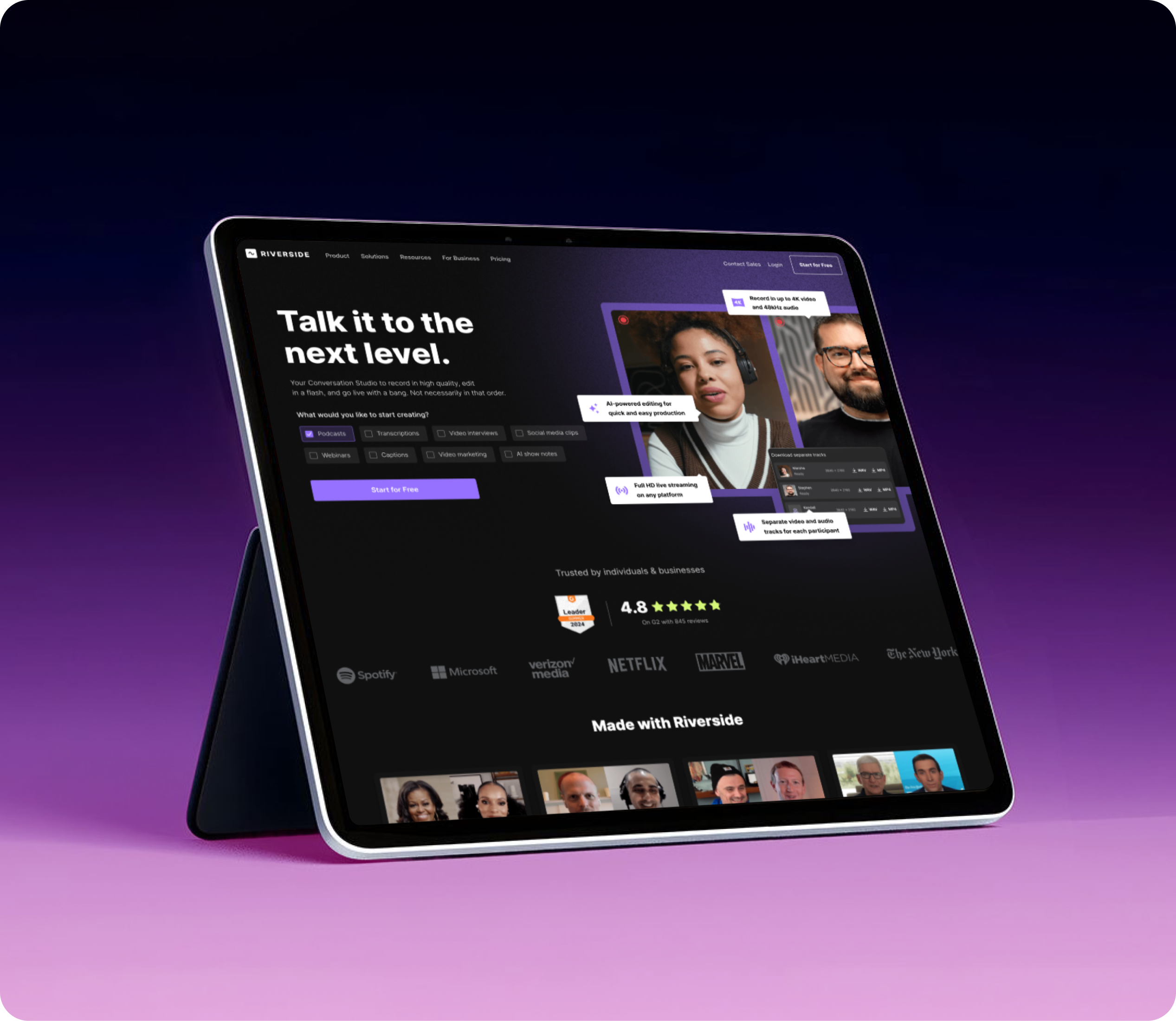
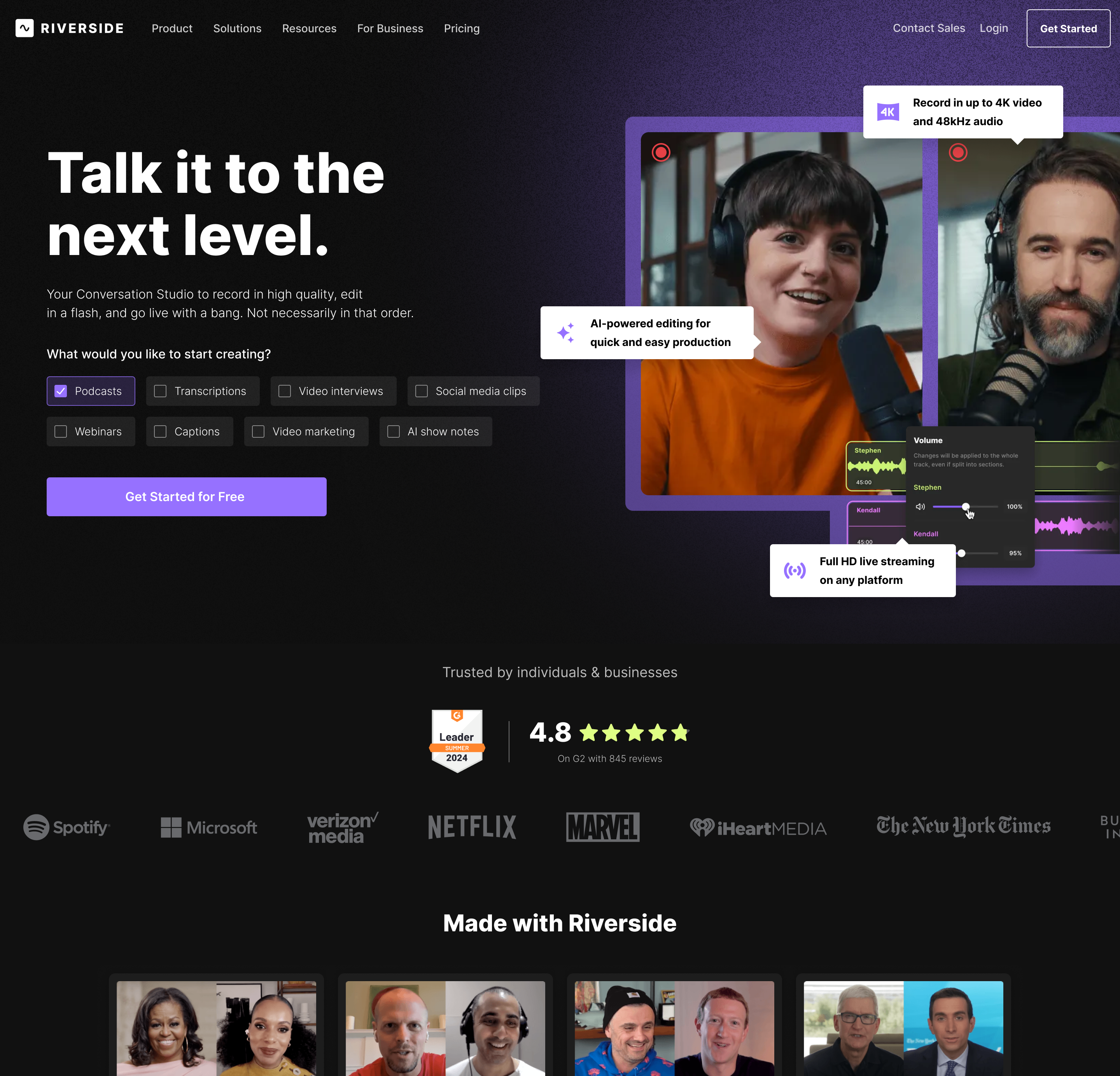
Riverside is a leading recording and content creation platform used by creators, businesses, and media teams worldwide. Through research and experimentation, we identified two major growth opportunities: improving homepage relevance through use-case personalization and reducing friction in the transcription onboarding flow. By helping users better understand the product's value and guiding them through key moments of the journey, we improved conversion performance across both acquisition and activation experiences.
Visit the live page →
Published:
Jun 2024
Industry:
Media Production SaaS
Project Type:
Product Design
My Role:
Product Designer
Scale:
100M+ recordings created
Business Impact:
+64% Sign up rate on Transcription
Book 15 minutes call
Hypothesis №1
Increase transcription adoption through clearer guidance and expectation management.
Research Insights
Data Highlights
Transcription Completion
Low Completion
Many users don't reach the moment where the transcript becomes available.



Workflow Guidance
Limited
Users struggle to understand the current processing stage and what happens next.
User Insights

"I wasn't sure if anything was happening."
User Interview, Podcast Creator
"I expected the transcript much sooner."
User Interview, First-time User
"I didn't know how much longer I had to wait."
User Interview, Video Creator
"I wasn't sure what would happen after uploading my file."
User Interview, Marketing Manager
ⓘ Charts illustrate relative user behavior trends rather than actual product metrics.
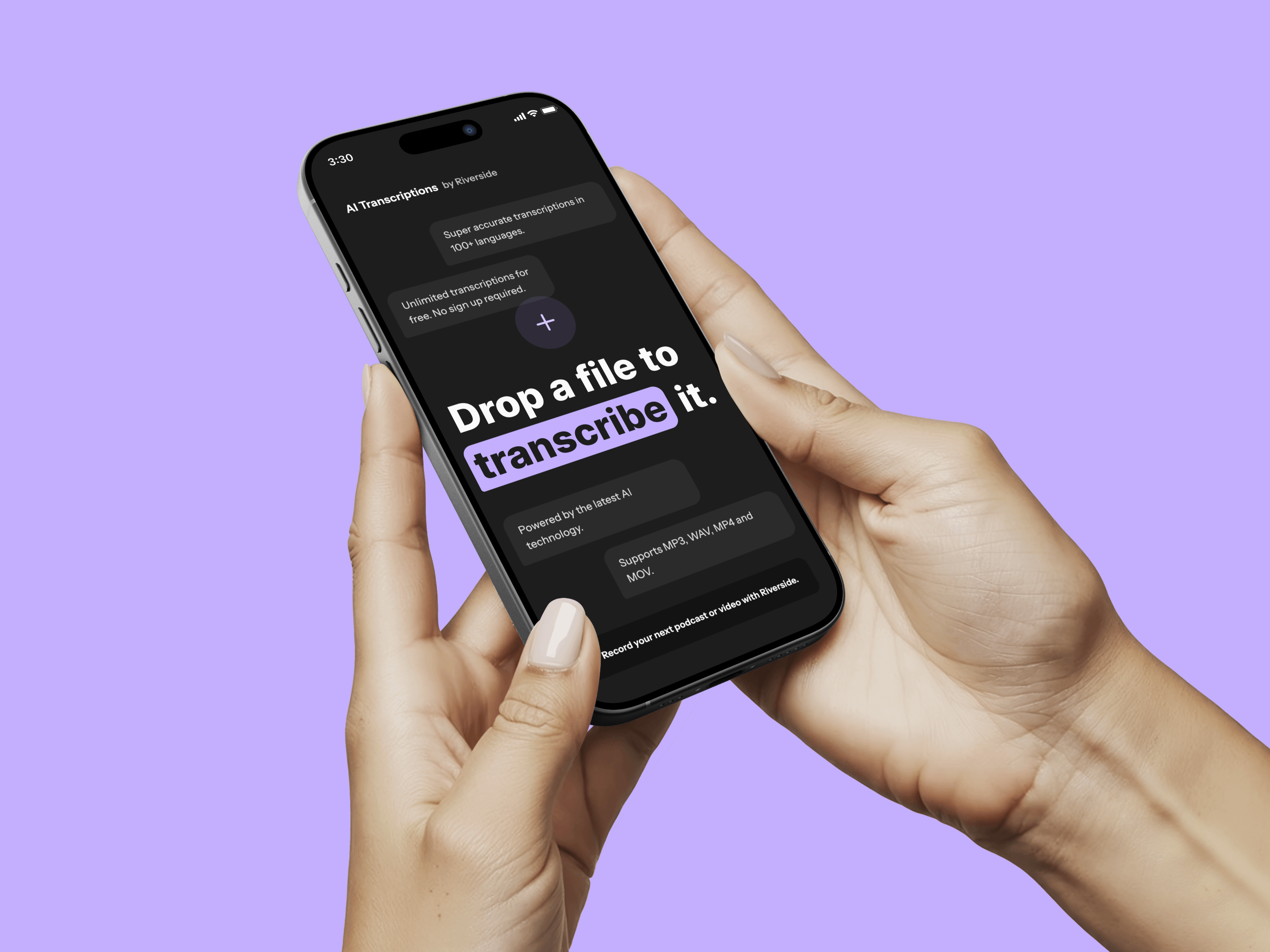
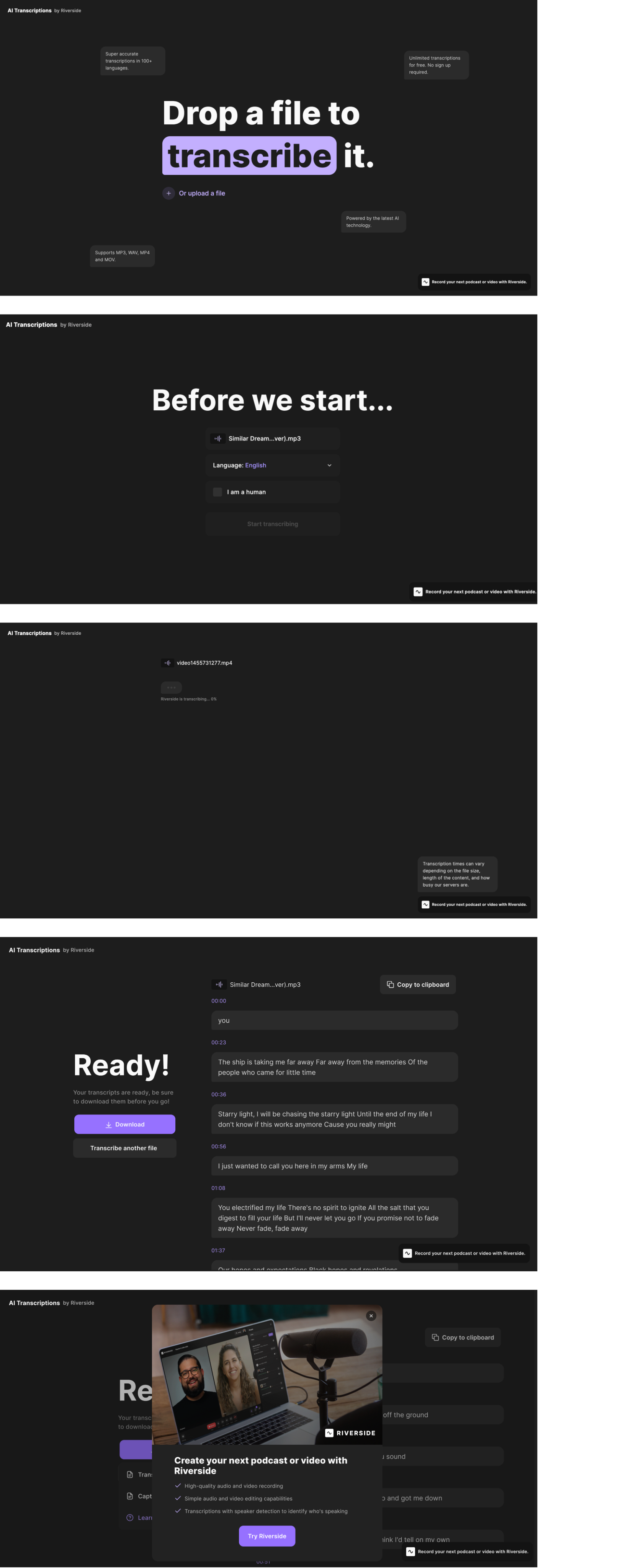
Existing version A
Challenges
Jan-Mar 2024

Users upload a file expecting a transcript within minutes. Between upload and the final result, they go through several waiting steps where uncertainty grows and the perceived product value is delayed.
❌
Delayed Value
Users had to wait before experiencing the core benefit.
❌
Limited Visibility
Progress and processing status were not always clear.
❌
Weak Guidance
The workflow provided little context during waiting periods.
❌
Drop-off Opportunity
Analytics showed users leaving before reaching the completed transcript.
Client Request
"We believe some of our most valuable features aren't reaching their full potential. We'd like to better understand where users drop off and how we can improve adoption."
drop off
Optimization Strategy
We redesigned the transcription journey to reduce uncertainty before users experienced the product's core value. By improving guidance, progress visibility, and expectation management, we transformed waiting time into an opportunity to educate users, build confidence, and increase activation.



Visibility
Make progress easy to understand.
Guidance
Explain each step before and during processing.
Confidence
Reduce uncertainty with clear status updates and feedback.
Activation
Highlight product benefits while users wait for results.

Concept Exploration
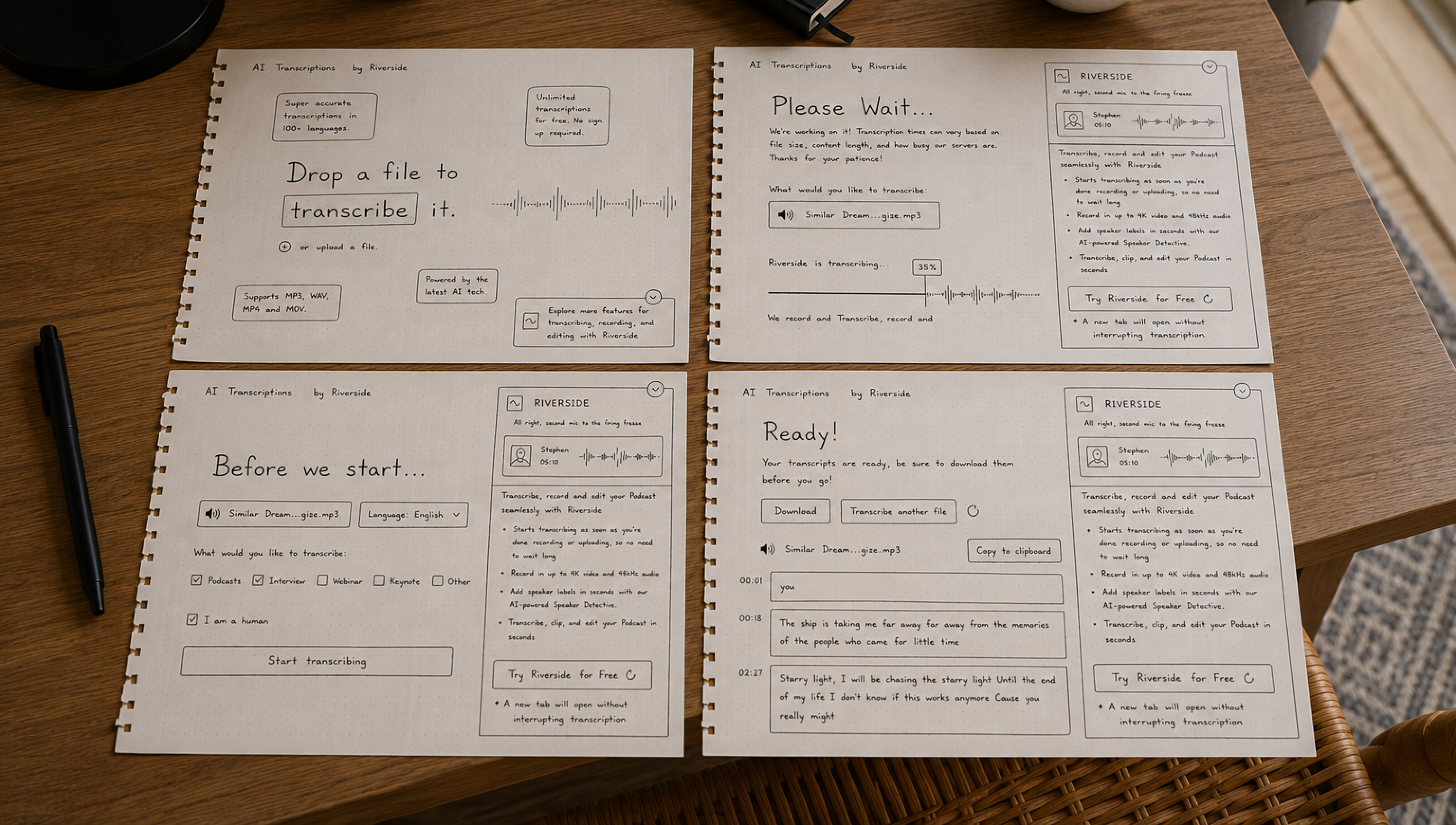
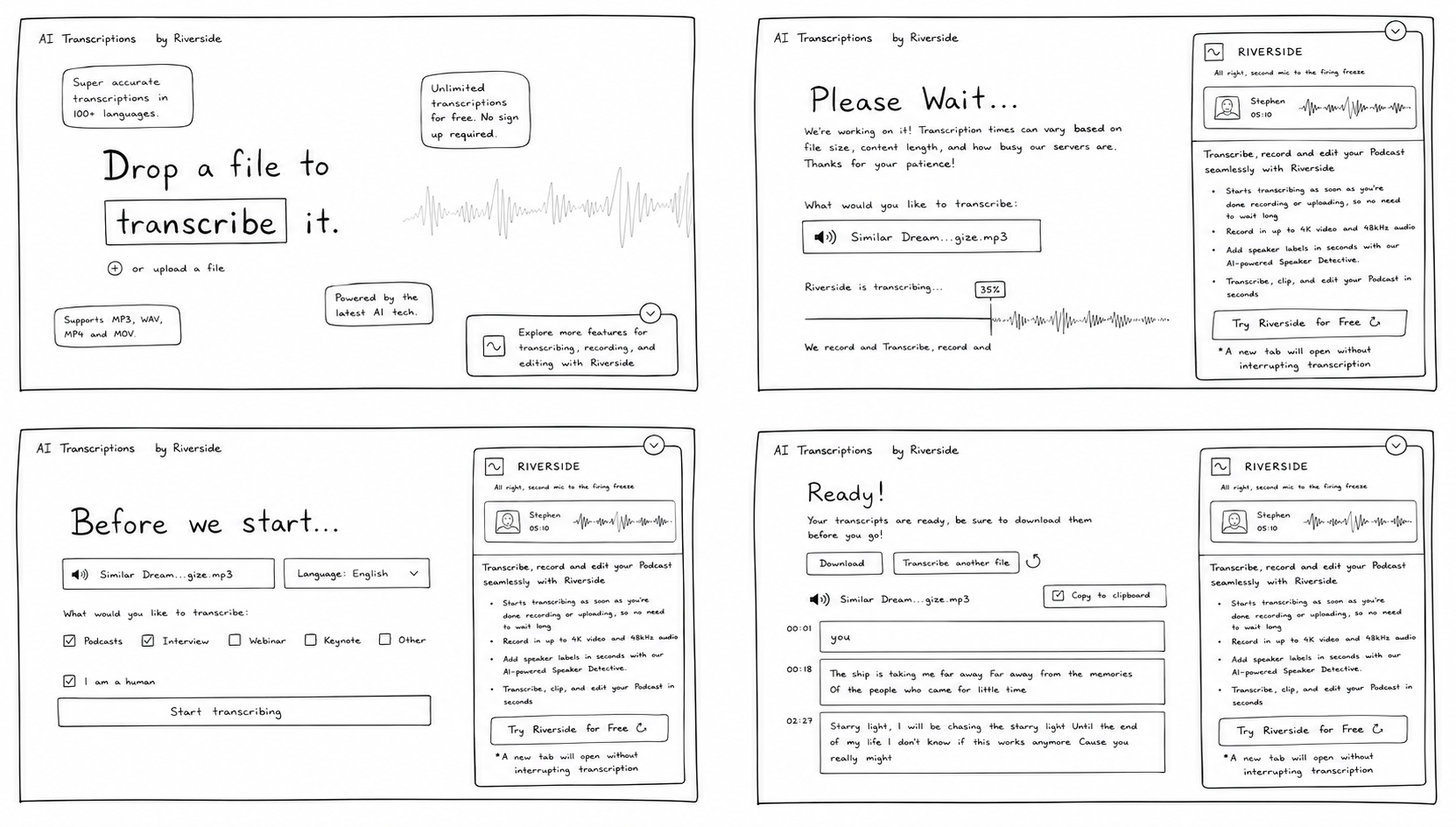
Several concepts explored ways to better communicate how AI transcription works while reducing uncertainty during processing. The focus was on improving product explanations, setting clear expectations, and making the workflow feel more transparent.
Understanding the User Journey
Mapped the end-to-end transcription journey to understand how users discover the feature, upload recordings, evaluate transcription quality, and decide to continue using the product. This helped identify opportunities to reduce friction, build trust, and increase activation and conversion.
Mapping the User Journey
1
Upload Recording

Curious

Users are unsure how accurate the transcription will be.


The upload experience should feel fast and effortless.

Encourage users to start their first transcription.
2
Understand Value
Engaged

Users don't always know which language or settings to choose.
Smart defaults reduce decision-making.
Help users begin transcription with confidence.
3
Processing Recording
Waiting
Waiting without feedback creates uncertainty.
Progress updates reassure users that work is happening.
Keep users engaged while transcription is processing.


4
Review Transcript
Impressed
Users immediately evaluate transcript quality.
The first result determines whether users trust the product.
Demonstrate speed and transcription accuracy.
5
Unlock Full Experience
Considering
Users need a compelling reason to upgrade.
Showing additional AI capabilities increases perceived value.
Convert satisfied users into paying customers.
6
Continue Creating
Relieved
Users need motivation to keep using the product.
A successful first experience builds long-term retention.
Encourage repeat usage and subscription.


Color System
Riverside combines neutral grayscale foundations with purple as the primary brand color, supported by blue and green accents for interactive elements and system feedback. The palette helps organize complex workflows while keeping the interface approachable.
#9671FF
Primary Brand Color
Used for primary actions, key highlights, and brand recognition throughout the experience.
#FFFFFF
Content Foundation
Provides clarity, readability, and breathing space across content-heavy sections.
#000102
Core Contrast
Used for typography, navigation, and structure to create strong visual hierarchy.
#DFFF84
Success Accent
Highlights positive outcomes, AI-powered capabilities, and key product benefits.
Typography
The product uses a scalable typography system with clear distinctions between headings, labels, and supporting text. Consistent spacing and readable type sizes make long workflows easier to navigate and understand.
Inter Bold
16 px
20 px
24 px
32 px
40 px
48 px
64 px
Design
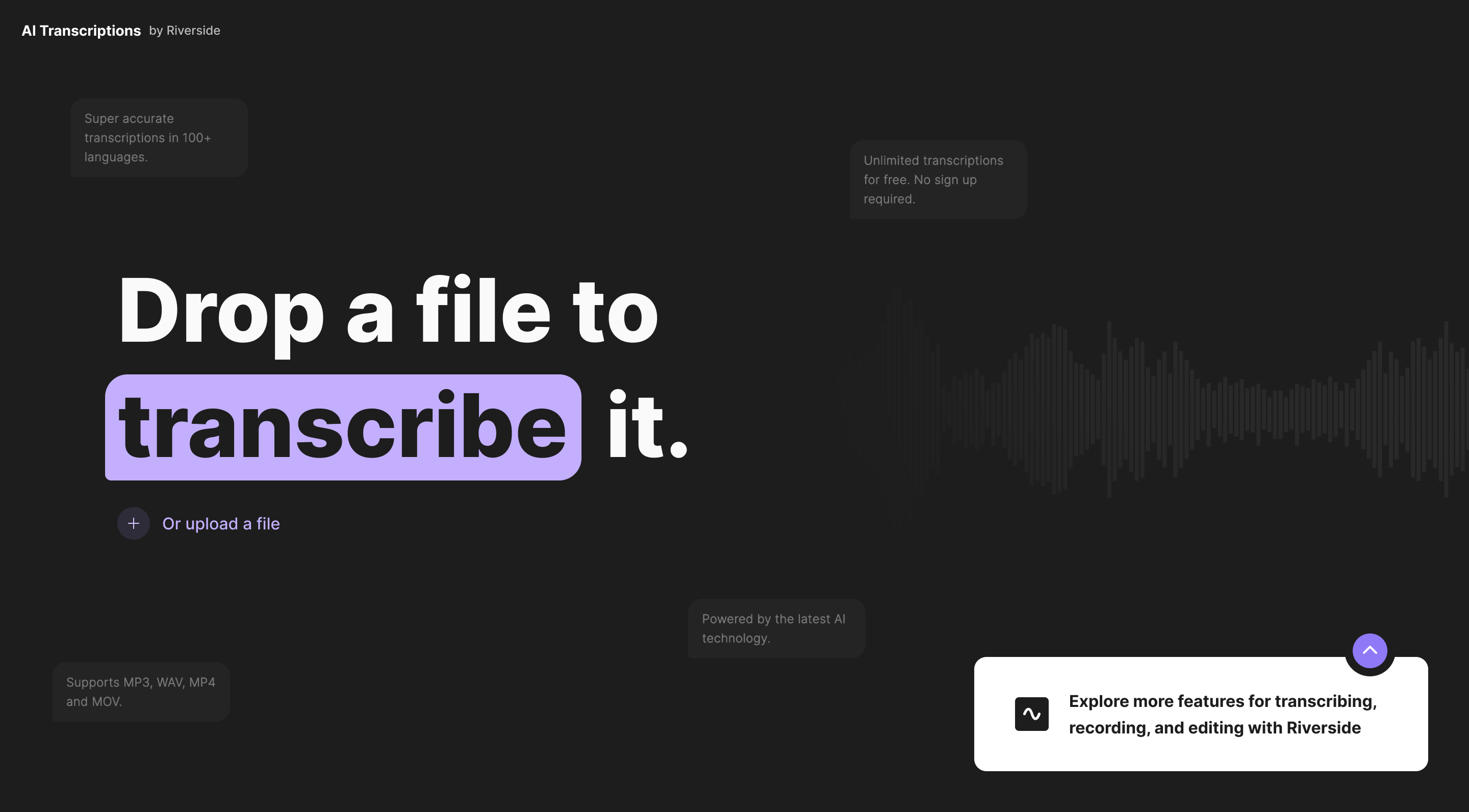
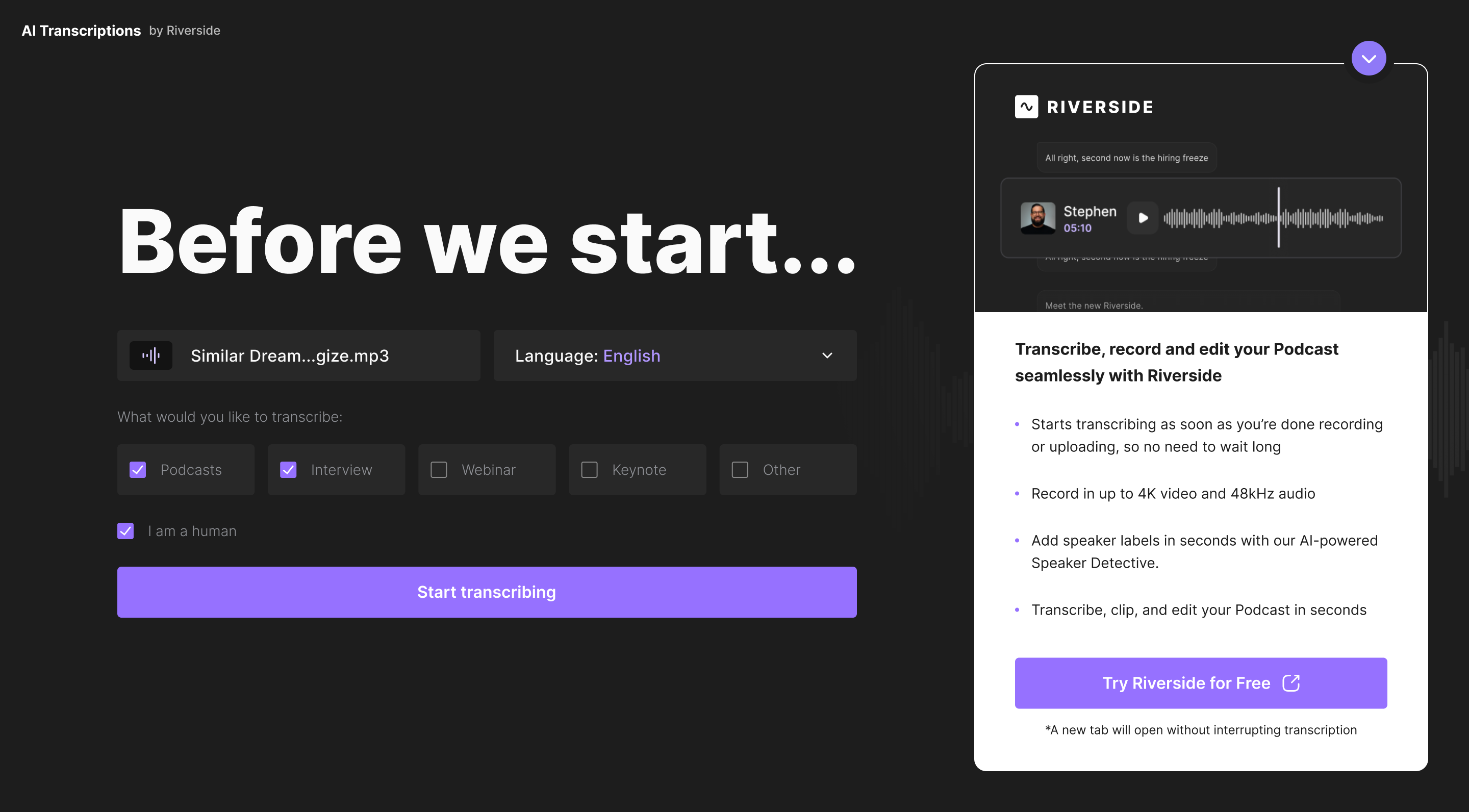
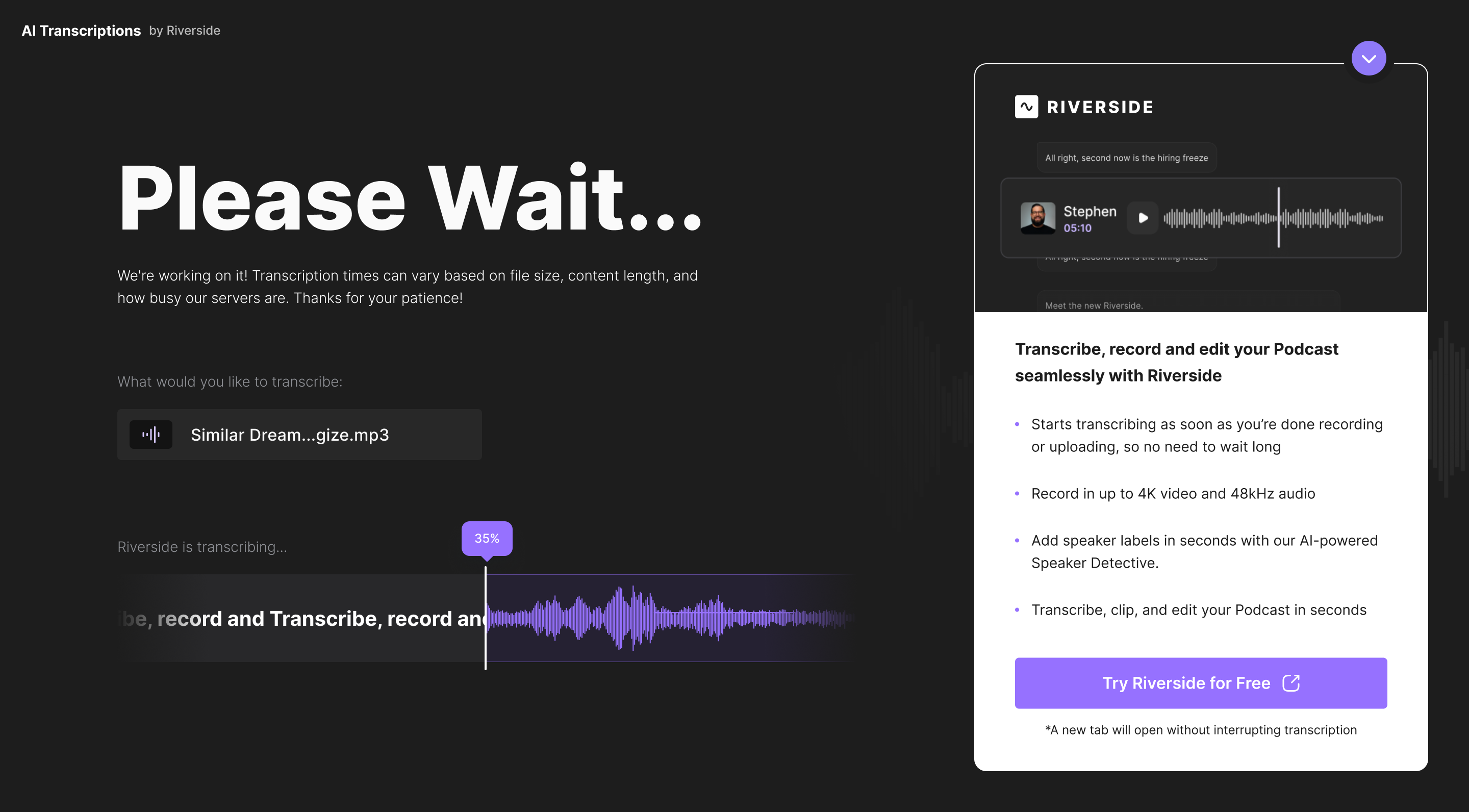
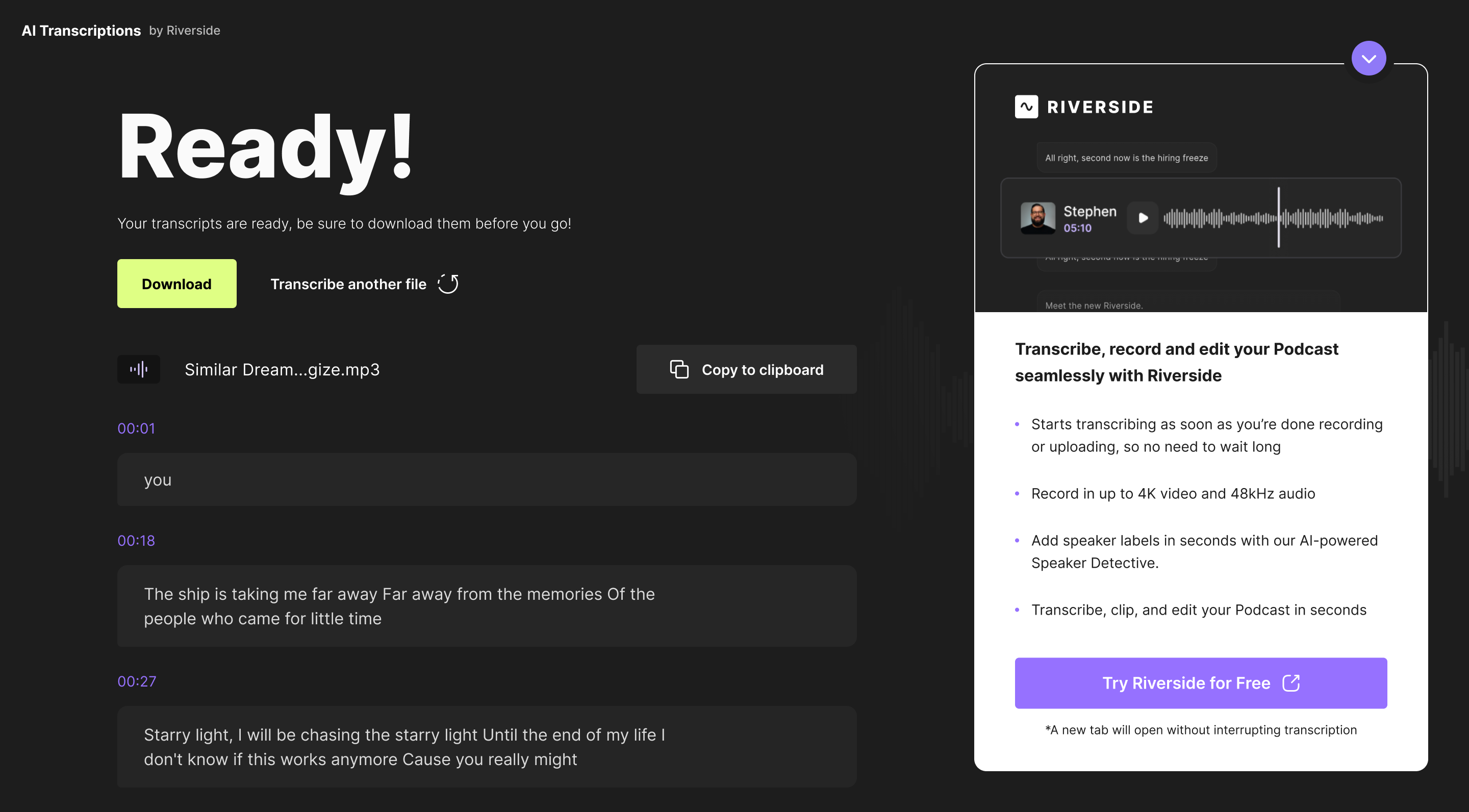
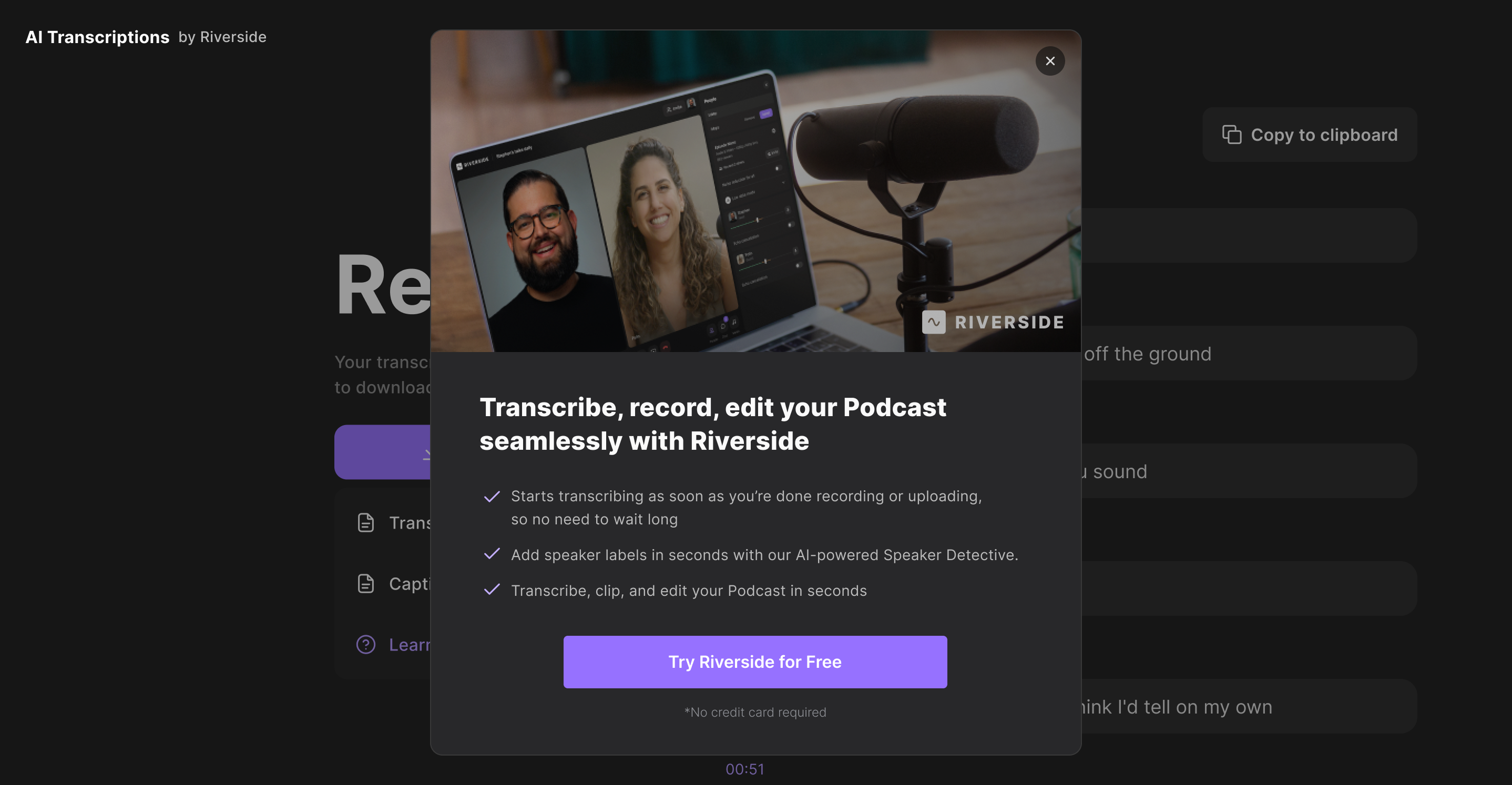
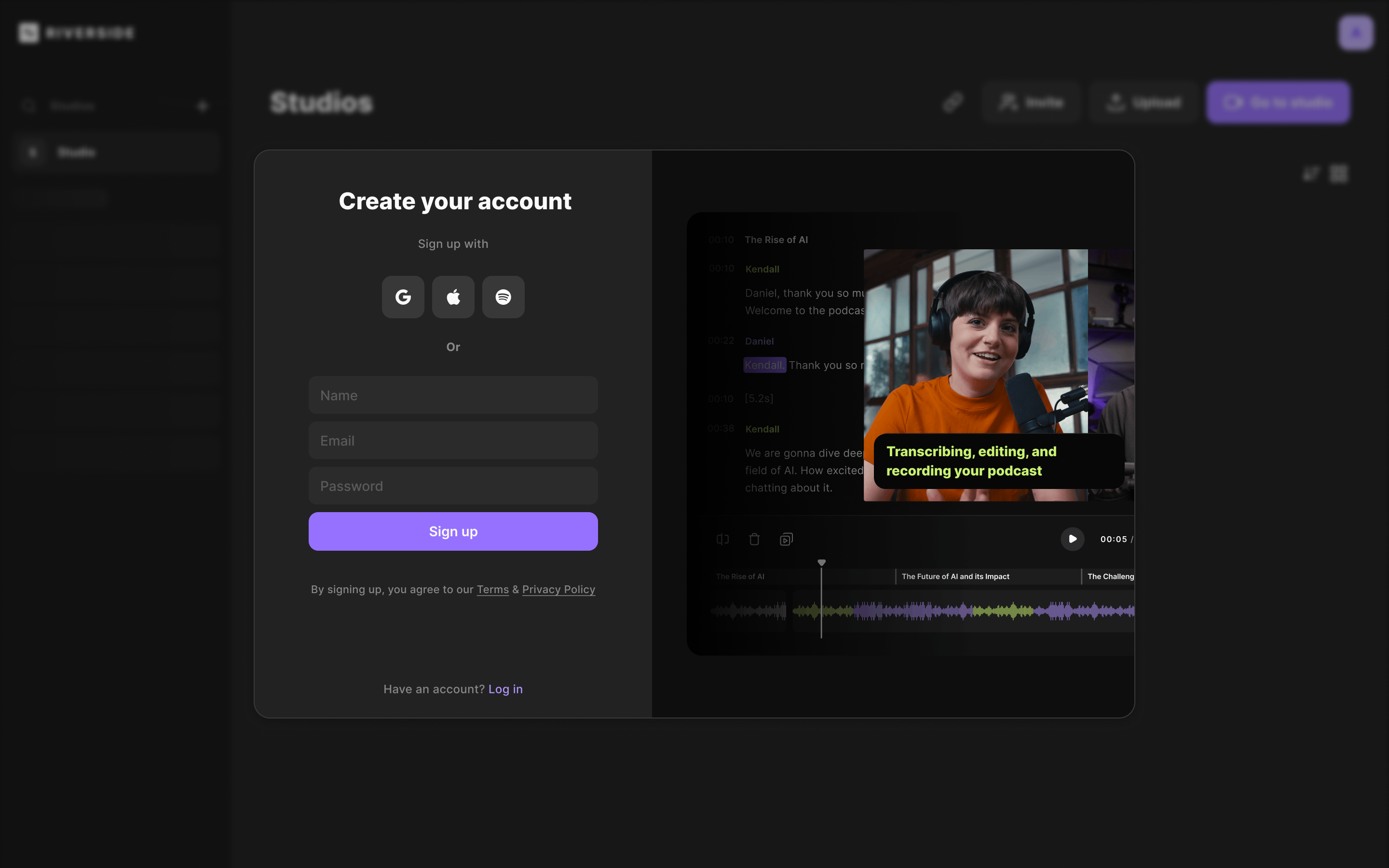
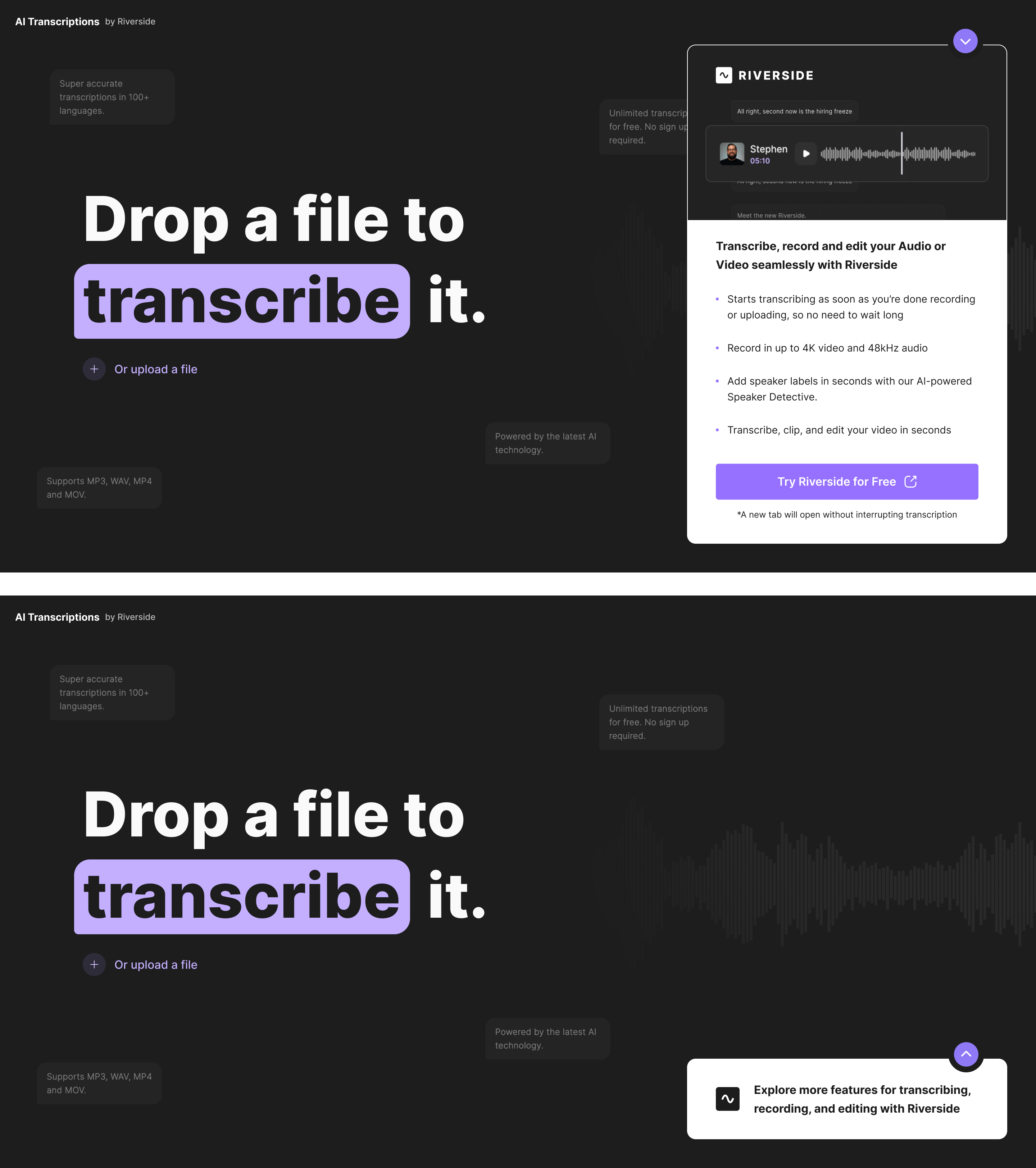
The final experience introduced clearer benefit messaging, real-time processing feedback, richer visual states, and a more intuitive interface. Together, these improvements helped users better understand the product and stay engaged throughout the transcription process.
Final Solution
The redesigned transcription experience focused on reducing uncertainty and helping users reach value faster. Clear progress indicators, improved guidance, and better expectation management made the workflow easier to follow and more predictable. By increasing transparency throughout the journey, users were more likely to stay engaged and complete the transcription process.
Results
Aug-Sep 2024
Version A
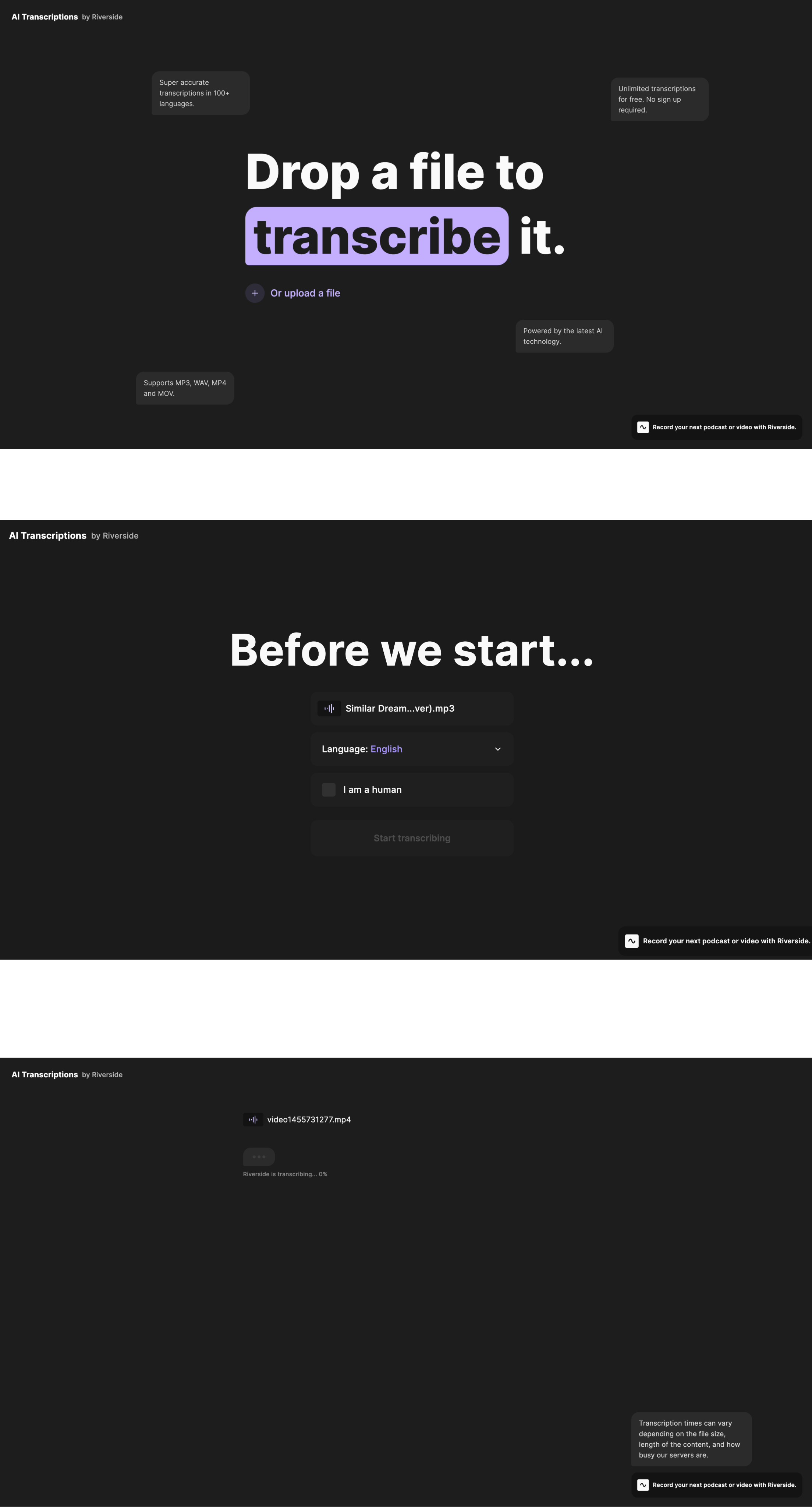
Challenges:
❌
Unclear Value
❌
Limited Visibility
❌
Weak Guidance
❌
Drop-off Opportunity
CvR (A)
Version B
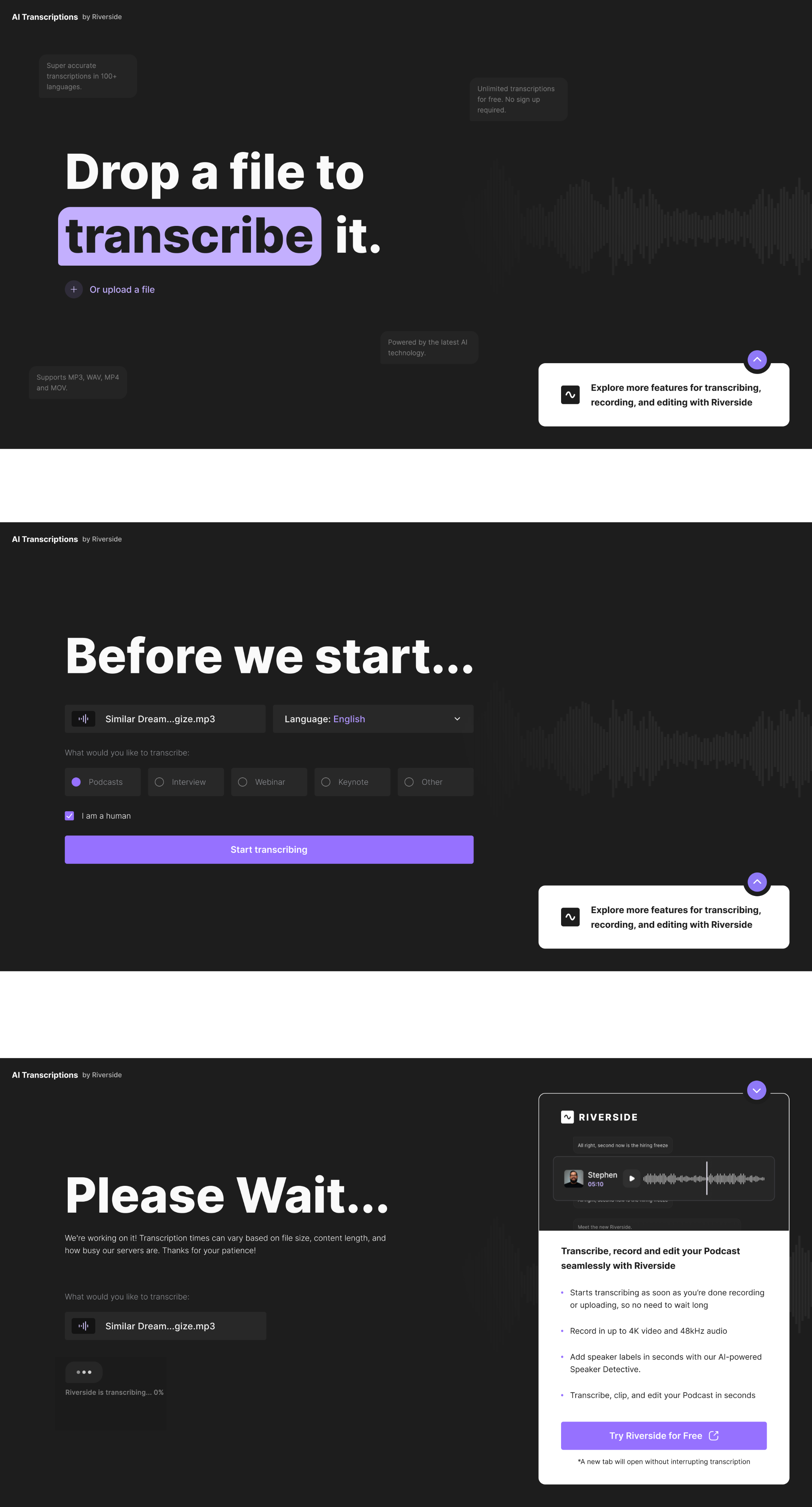
Transcription → Sign-up
+64% CvR
Sign-up → Activation
+18% CvR
Total Riverside Sign-ups
+6%
+64%Sign-ups
Hypothesis №2
Improve homepage relevance through personalized use-case communication.
Research Insights
Data Highlights
Plan Comparison
Low
Visitors struggle to identify whether Riverside is built for their specific workflow.


Use Case Clarity
Limited
Many visitors leave without understanding when and why they should use Riverside.
User Insights
"I'm not sure if Riverside is built for someone like me."
User Interview, Freelancer
"I couldn't immediately tell what makes Riverside different."
User Interview, New Visitor
"I wasn't sure when I would actually use Riverside."
User Interview, Agency Owner
"I wanted to know if Riverside would fit my workflow before committing."
User Interview, Content Creator
ⓘ Charts illustrate relative user behavior trends rather than actual product metrics.
Existing version A
Chalange
Jan-Mar 2024
❌
Generic Messaging
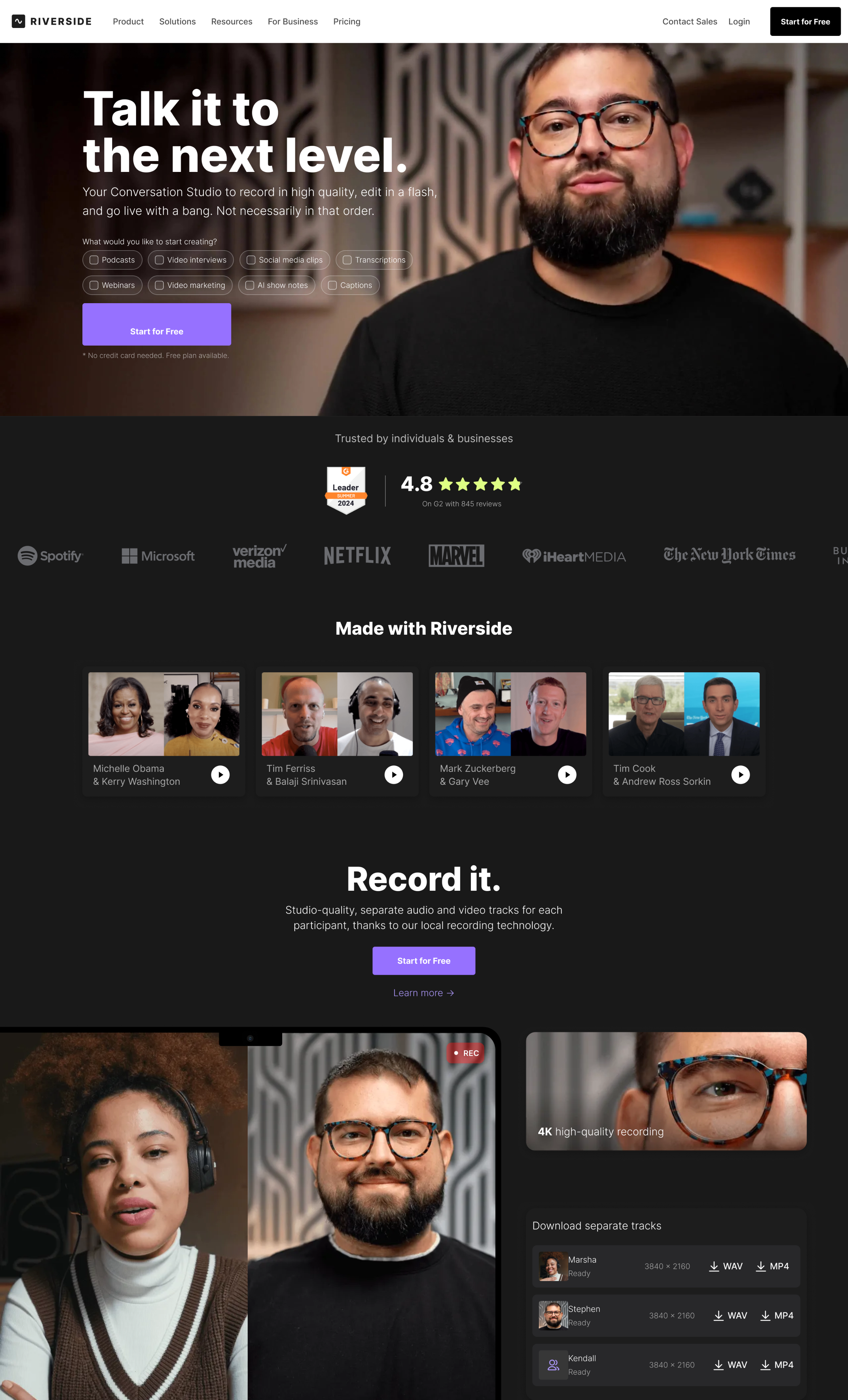
Research showed that users struggled to identify how Riverside fit their specific workflow.
❌
Broad Audience
The product served multiple audiences, but the experience communicated them in a generic way.
❌
Unclear Use Cases
User interviews revealed uncertainty around when and why to use Riverside.
❌
Low Relevance
Analytics suggested many visitors left before exploring features relevant to their needs.
Optimization Strategy
We focused on helping visitors quickly recognize themselves within the product experience. The strategy centered around clearer audience segmentation, stronger use-case communication, and more relevant product storytelling. By connecting features to real-world workflows, we aimed to make Riverside feel more relevant from the very first interaction.
Relevance
Connect users with their use case.
Clarity
Simplify product communication.
Context
Show real-world workflows.
Segmentation
Address different audience needs.
Concept Exploration
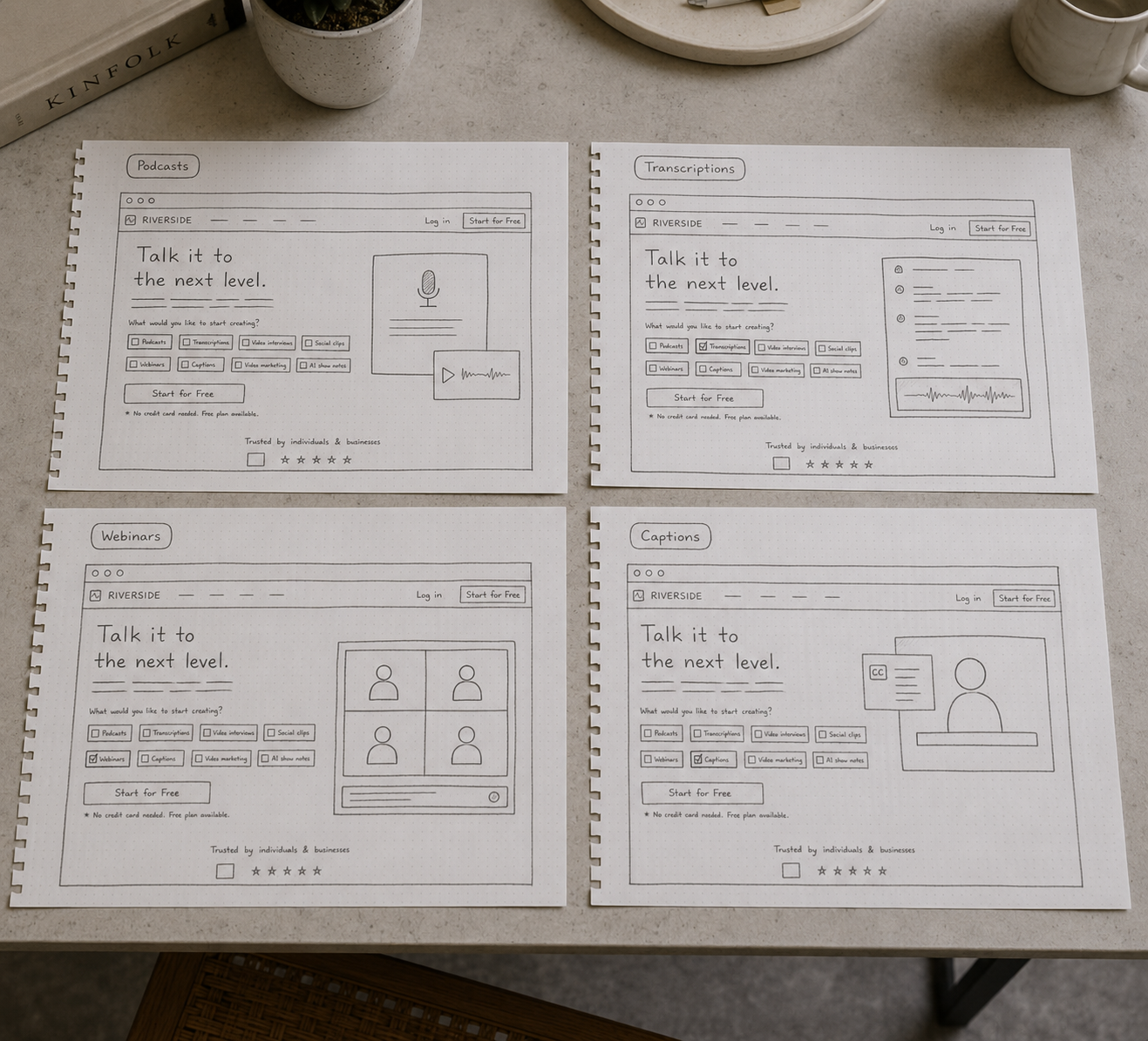
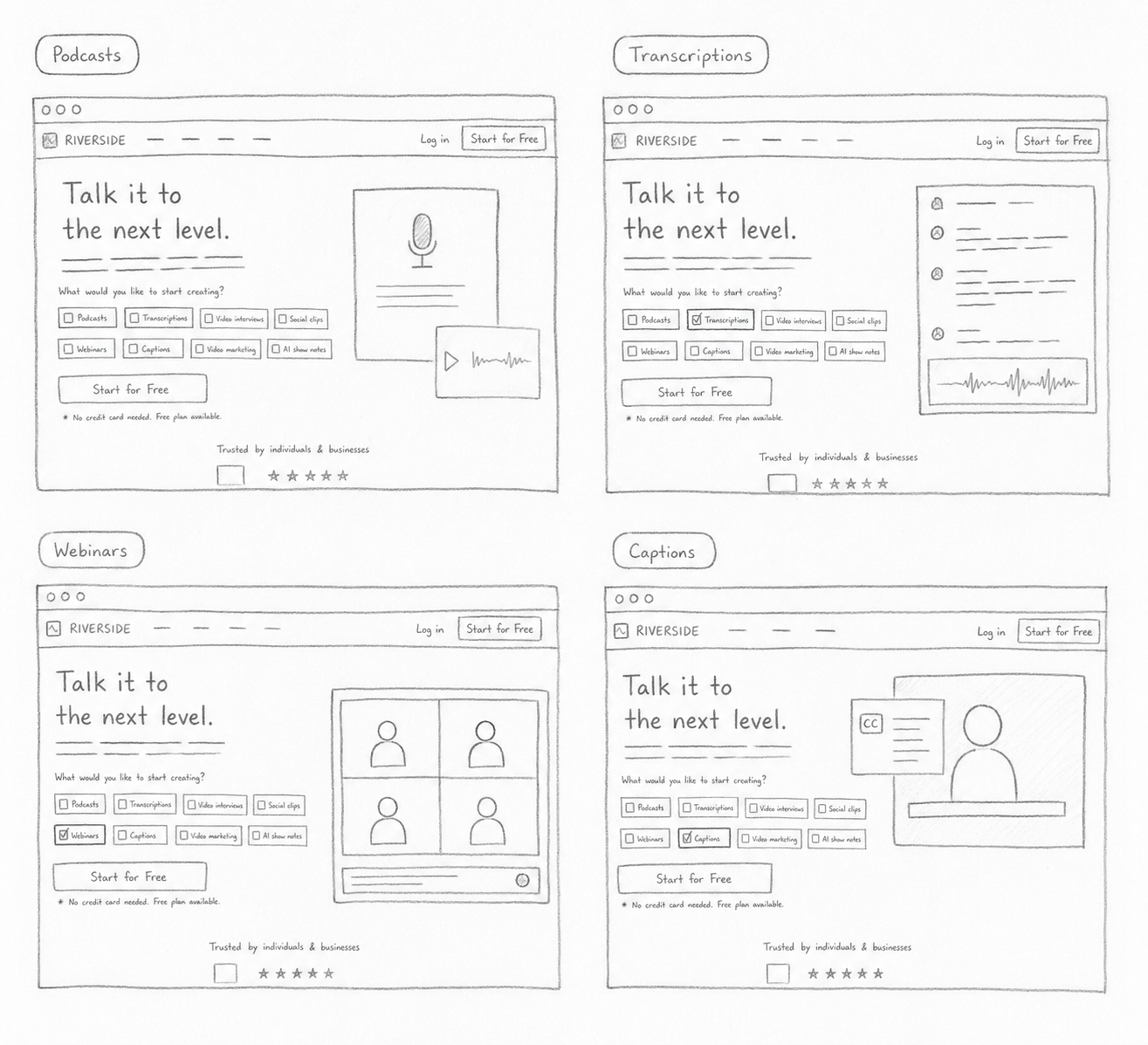
Multiple concepts explored how personalized hero content could instantly communicate the value of each Riverside product. Different visual directions focused on matching every selected use case with a dedicated illustration and supporting messaging.
Design
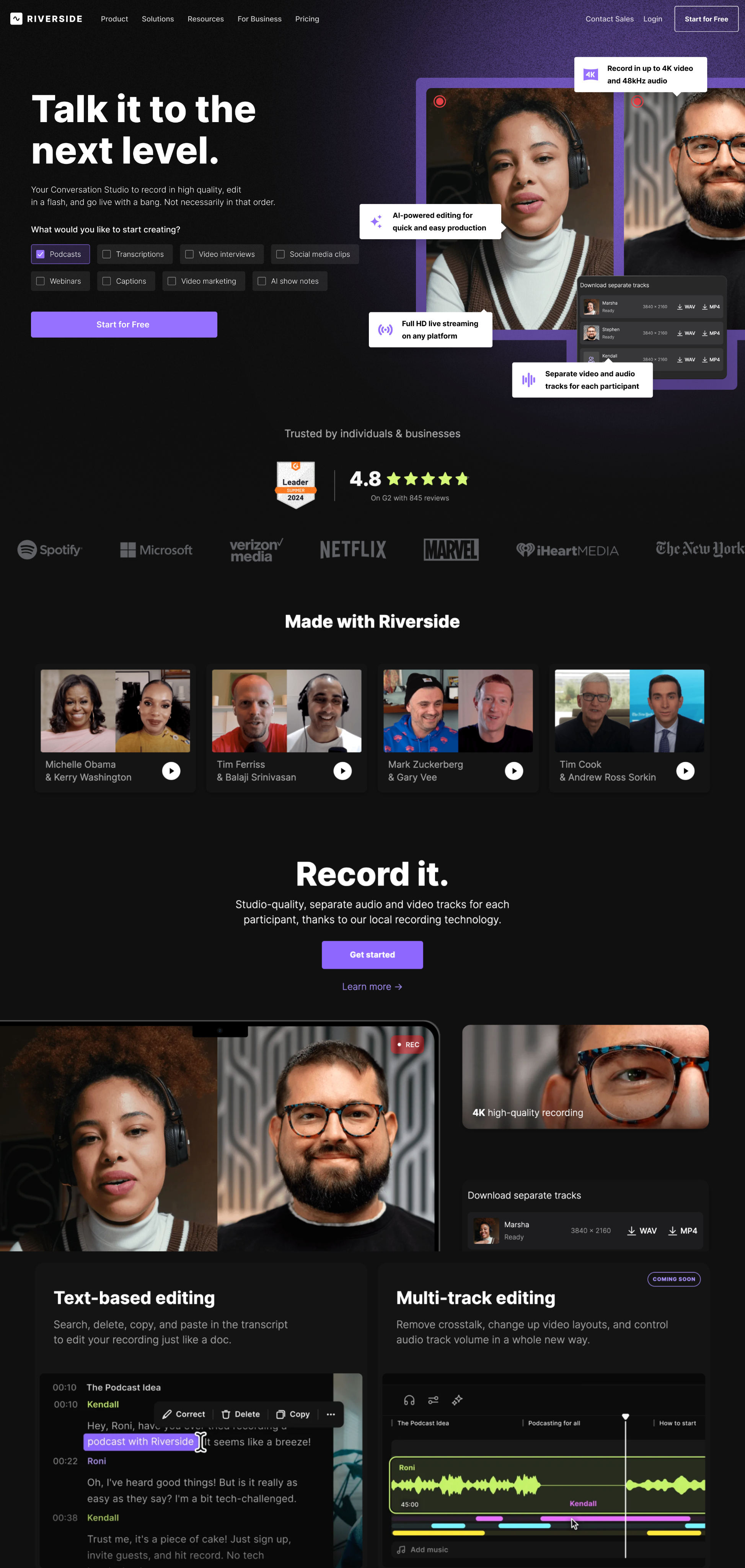
The final design combined contextual illustrations with clearer headlines and supporting copy, making each product's value immediately understandable. The improved visual hierarchy created a more engaging and personalized first impression.
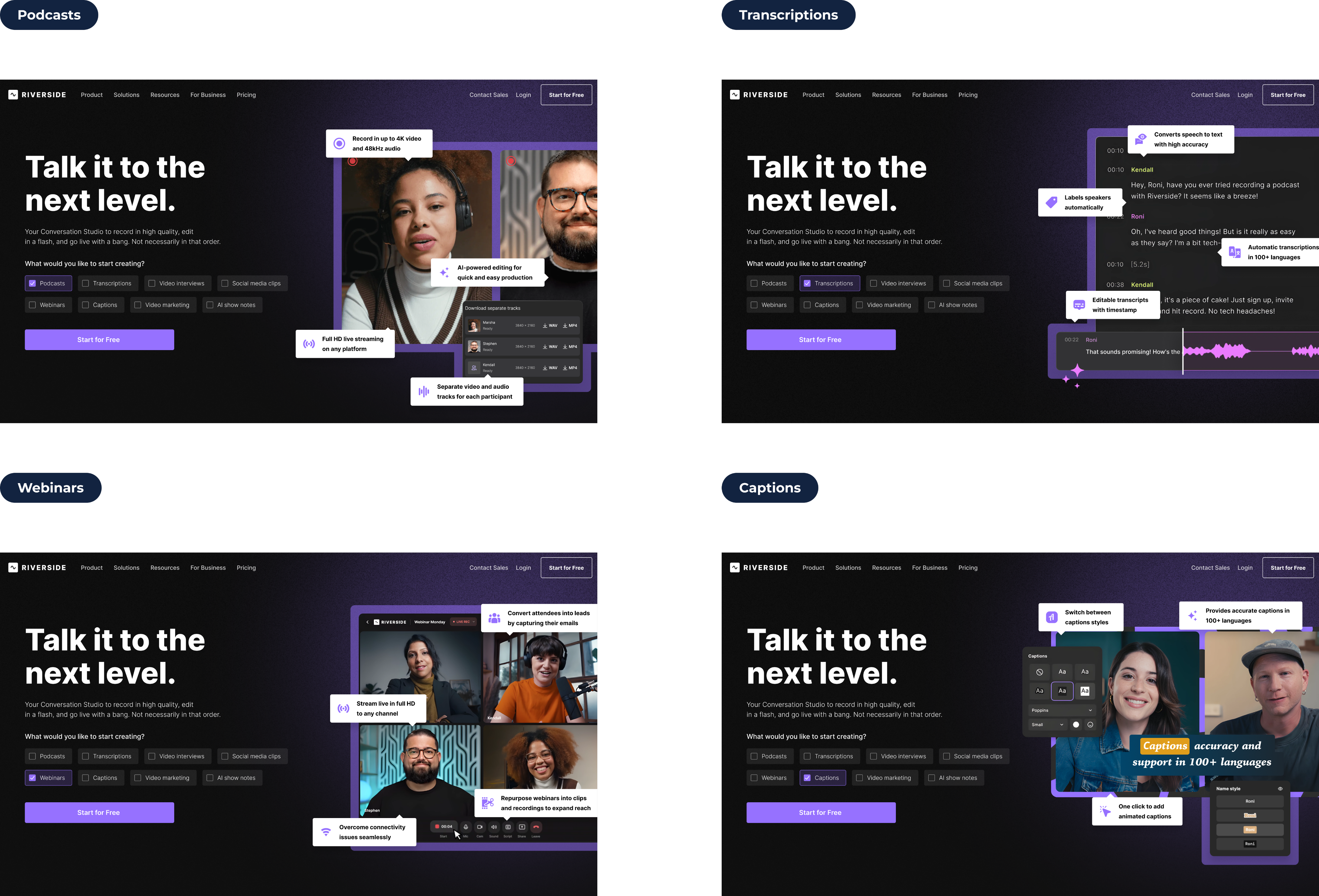
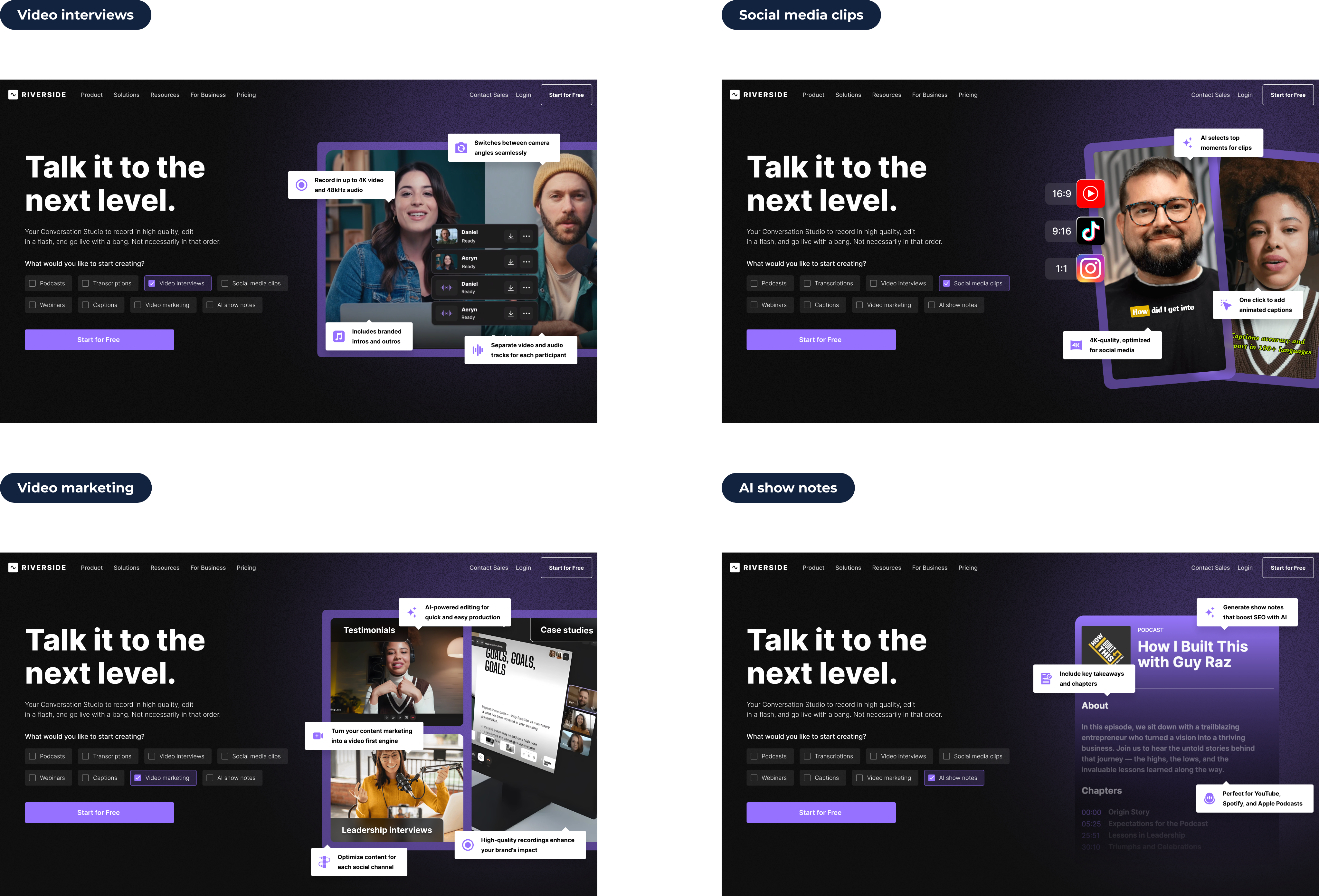
Final Solution
The redesigned homepage helped visitors quickly recognize their use case and understand how Riverside could support their workflow. By combining audience-specific messaging, clearer product positioning, and stronger visual storytelling, the experience became more relevant and easier to navigate. This created a more personalized acquisition journey and improved homepage conversion performance.
Results
Jun-Jul 2024
Version A
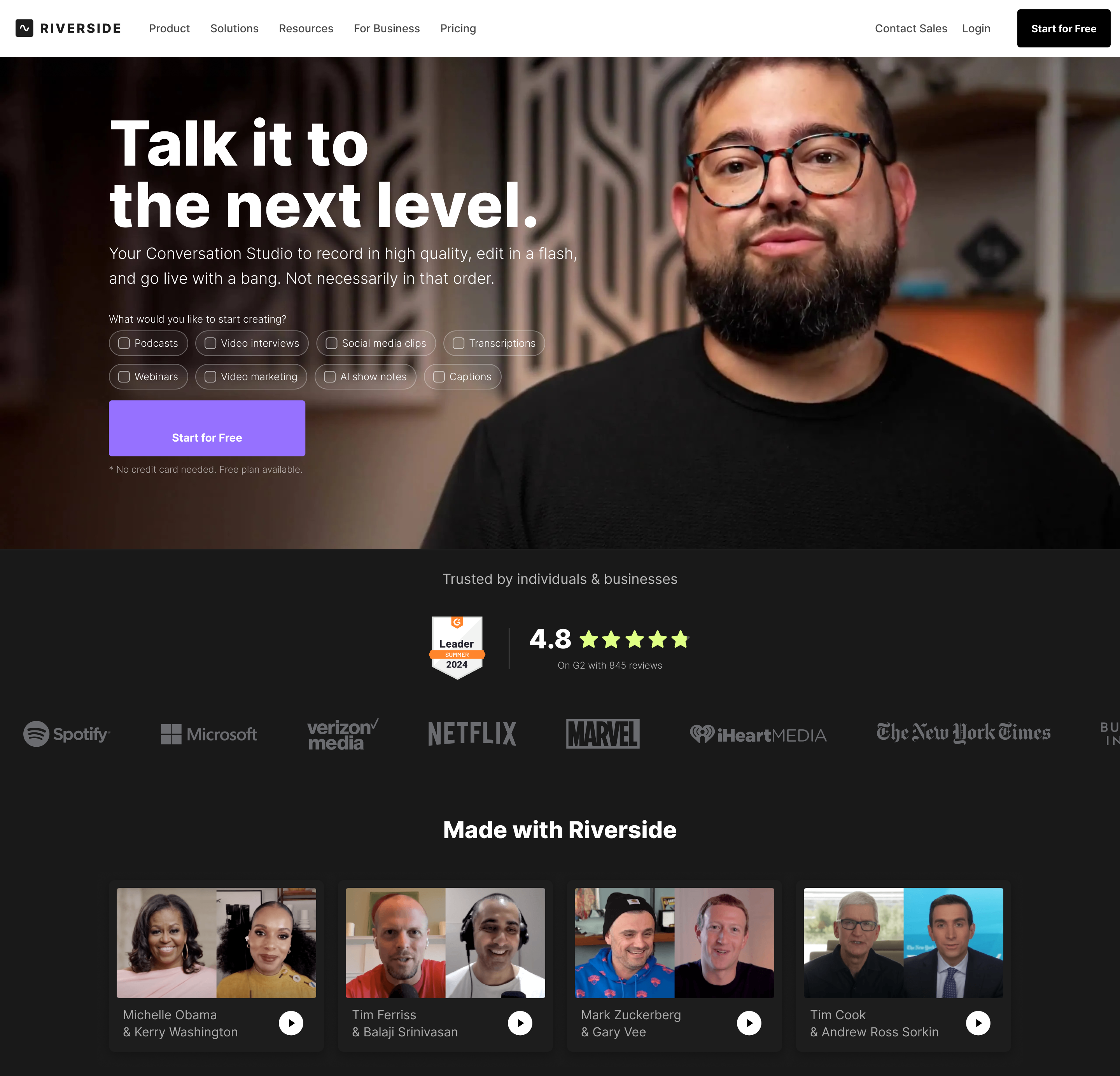
Challenges:
❌
Generic Messaging
❌
Broad Audience
❌
Unclear Use Cases
❌
Low Relevance
CvR (A)
Version B
Homepage → CTA Click
+7% CvR
Product Exploration → Sign-up
+7% CvR
Homepage → Transaction
+6% CvR
CvR +6%
CleanMyMac is a well-known Mac optimization tool by MacPaw. My goal was to improve the landing experience and increase conversions by making the value clearer and the page easier to trust. The product was strong. The communication was not strong enough.

"This project reinforced that improving clarity, guidance, and trust across key user journeys can unlock significant business impact without changing the core product."
impact
Let’s Discuss
your Project!
Schedule a Consult


© Copyright 2022, All Rights Reserved
Riverside is a leading recording and content creation platform used by creators, businesses, and media teams worldwide. Through research and experimentation, we identified two major growth opportunities: improving homepage relevance through use-case personalization and reducing friction in the transcription onboarding flow. By helping users better understand the product's value and guiding them through key moments of the journey, we improved conversion performance across both acquisition and activation experiences.
Visit the live page →
Book 15 minutes call
Published:
Jun 2024
Industry:
Media Production SaaS
Project Type:
Product Design
My Role:
Product Designer
Scale:
100M+ recordings created
Business Impact:
+64% Sign up rate on Transcription
Hypothesis №1
Increase transcription adoption through clearer guidance and expectation management.
Client Request
"We believe some of our most valuable features aren't reaching their full potential. We'd like to better understand where users drop off and how we can improve adoption."
drop off
Research Insights
Data Highlights
Transcription Completion
Low Completion
Many users don't reach the moment where the transcript becomes available.
Workflow Guidance
Limited
Users struggle to understand the current processing stage and what happens next.
User Insights
"I wasn't sure if anything was happening."
User Interview, Podcast Creator
"I expected the transcript much sooner."
User Interview, First-time User
"I didn't know how much longer I had to wait."
User Interview, Video Creator
"I wasn't sure what would happen after uploading my file."
User Interview, Marketing Manager
ⓘ Charts illustrate relative user behavior trends rather than actual product metrics.
Existing version A
Challenges
Jan-Mar 2024

Users upload a file expecting a transcript within minutes. Between upload and the final result, they go through several waiting steps where uncertainty grows and the perceived product value is delayed.
❌
Delayed Value
Users had to wait before experiencing the core benefit.
❌
Limited Visibility
Progress and processing status were not always clear.
❌
Weak Guidance
The workflow provided little context during waiting periods.
❌
Drop-off Opportunity
Analytics showed users leaving before reaching the completed transcript.
OptimizationStrategy


Visibility
Guidance
Confidence
Activation
Make progress easy to understand.
Explain each step before and during processing.
Reduce uncertainty with clear status updates and feedback.
Highlight product benefits while users wait for results.

We redesigned the transcription journey to reduce uncertainty before users experienced the product's core value. By improving guidance, progress visibility, and expectation management, we transformed waiting time into an opportunity to educate users, build confidence, and increase activation.
Concept Exploration
Several concepts explored ways to better communicate how AI transcription works while reducing uncertainty during processing. The focus was on improving product explanations, setting clear expectations, and making the workflow feel more transparent.
Understanding the User Journey
Mapped the end-to-end transcription journey to understand how users discover the feature, upload recordings, evaluate transcription quality, and decide to continue using the product. This helped identify opportunities to reduce friction, build trust, and increase activation and conversion.
Mapping the User Journey
1
Upload Recording
Curious

Pain
Users are unsure how accurate the transcription will be.


Insight
The upload experience should feel fast and effortless.

Goal
Encourage users to start their first transcription.
2
Understand Value
Engaged
Pain
Users don't always know which language or settings to choose.
Insight
Smart defaults reduce decision-making.
Goal
Help users begin transcription with confidence.
3
Processing Recording
Waiting
Pain
Waiting without feedback creates uncertainty.
Insight
Progress updates reassure users that work is happening.
Goal
Keep users engaged while transcription is processing.

4
Review Transcript
Impressed
Pain
Users immediately evaluate transcript quality.
Insight
The first result determines whether users trust the product.
Goal
Demonstrate speed and transcription accuracy.
5
Unlock Full Experience
Considering
Pain
Users need a compelling reason to upgrade.
Insight
Showing additional AI capabilities increases perceived value.
Goal
Convert satisfied users into paying customers.
6
Continue Creating
Relieved
Pain
Users need motivation to keep using the product.
Insight
A successful first experience builds long-term retention.
Goal
Encourage repeat usage and subscription.

#FFFFFF
Content Foundation
Provides clarity, readability, and breathing space across content-heavy sections.
#000102
Core Contrast
Used for typography, navigation, and structure to create strong visual hierarchy.
#DFFF84
Success Accent
Highlights positive outcomes, AI-powered capabilities, and key product benefits.
#9671FF
Primary Brand Color
Used for primary actions, key highlights, and brand recognition throughout the experience.
Typography
The product uses a scalable typography system with clear distinctions between headings, labels, and supporting text. Consistent spacing and readable type sizes make long workflows easier to navigate and understand.
Inter Bold
Color System
Riverside combines neutral grayscale foundations with purple as the primary brand color, supported by blue and green accents for interactive elements and system feedback. The palette helps organize complex workflows while keeping the interface approachable.
16 px
20 px
24 px
32 px
40 px
48 px
64 px
Design
The final experience introduced clearer benefit messaging, real-time processing feedback, richer visual states, and a more intuitive interface. Together, these improvements helped users better understand the product and stay engaged throughout the transcription process.
Final Solution
The redesigned transcription experience focused on reducing uncertainty and helping users reach value faster. Clear progress indicators, improved guidance, and better expectation management made the workflow easier to follow and more predictable. By increasing transparency throughout the journey, users were more likely to stay engaged and complete the transcription process.
Results
Aug-Sep 2024
Version A
Challenges:
❌
Unclear Value
❌
Limited Visibility
❌
Weak Guidance
❌
Drop-off Opportunity
CvR (A)
Version B
Transcription → Sign-up
+64% CvR
Sign-up → Activation
+18% CvR
Total Riverside Sign-ups
+6%
+64%Sign-ups
Hypothesis №2
Improve homepage relevance through personalized use-case communication.
Client Request
"We know Riverside creates value for many different audiences. The challenge is helping users quickly recognize where that value applies to them."
challenge
Research Insights
Data Highlights
Plan Comparison
Low
Visitors struggle to identify whether Riverside is built for their specific workflow.
Use Case Clarity
Limited
Many visitors leave without understanding when and why they should use Riverside.
User Insights
"I'm not sure if Riverside is built for someone like me."
User Interview, Freelancer
"I couldn't immediately tell what makes Riverside different."
User Interview, New Visitor
"I wasn't sure when I would actually use Riverside."
User Interview, Agency Owner
"I wanted to know if Riverside would fit my workflow before committing."
User Interview, Content Creator
ⓘ Charts illustrate relative user behavior trends rather than actual product metrics.
Existing version A
Chalange
Jan-Mar 2024
❌
Generic Messaging
Research showed that users struggled to identify how Riverside fit their specific workflow.
❌
Broad Audience
The product served multiple audiences, but the experience communicated them in a generic way.
❌
Unclear Use Cases
User interviews revealed uncertainty around when and why to use Riverside.
❌
Low Relevance
Analytics suggested many visitors left before exploring features relevant to their needs.
OptimizationStrategy
Relevance
Clarity
Context
Segmentation
Connect users with their use case.
Simplify product communication.
Show real-world workflows.
Address different audience needs.
We focused on helping visitors quickly recognize themselves within the product experience. The strategy centered around clearer audience segmentation, stronger use-case communication, and more relevant product storytelling. By connecting features to real-world workflows, we aimed to make Riverside feel more relevant from the very first interaction.
Concept Exploration
Multiple concepts explored how personalized hero content could instantly communicate the value of each Riverside product. Different visual directions focused on matching every selected use case with a dedicated illustration and supporting messaging.
Design
The final design combined contextual illustrations with clearer headlines and supporting copy, making each product's value immediately understandable. The improved visual hierarchy created a more engaging and personalized first impression.
Final Solution
The redesigned homepage helped visitors quickly recognize their use case and understand how Riverside could support their workflow. By combining audience-specific messaging, clearer product positioning, and stronger visual storytelling, the experience became more relevant and easier to navigate. This created a more personalized acquisition journey and improved homepage conversion performance.
Results
Jun-Jul 2024
Version A
Challenges:
❌
Generic Messaging
❌
Broad Audience
❌
Unclear Use Cases
❌
Low Relevance
CvR (A)
Version B
Homepage → CTA Click
+7% CvR
Product Exploration → Sign-up
+7% CvR
Homepage → Transaction
+6% CvR
CvR +6%




"This project reinforced that improving clarity, guidance, and trust across key user journeys can unlock significant business impact without changing the core product."
impact
This project demonstrated how small improvements throughout a critical user journey can create measurable business impact. By reducing uncertainty, improving guidance, and helping users reach value faster, the redesigned experience increased activation while maintaining a simple and intuitive workflow.
Let’s Discuss your Project!
Schedule a Consult
© Copyright 2022, All Rights Reserved
Kyrylo Buriak
Riverside is a leading recording and content creation platform used by creators, businesses, and media teams worldwide. Through research and experimentation, we identified two major growth opportunities: improving homepage relevance through use-case personalization and reducing friction in the transcription onboarding flow. By helping users better understand the product's value and guiding them through key moments of the journey, we improved conversion performance across both acquisition and activation experiences.
Visit the live page →
Published:
Jun 2024
Industry:
Media Production SaaS
Project Type:
Product Design
My Role:
Product Designer
Scale:
100M+ recordings created
Business Impact:
+64% Sign up rate on Transcription
Book 15 minutes call
Hypothesis №1
Increase transcription adoption through clearer guidance and expectation management.
Client Request
"We believe some of our most valuable features aren't reaching their full potential. We'd like to better understand where users drop off and how we can improve adoption."
drop off
Research Insights
Data Highlights
Transcription Completion
Low Completion
Many users don't reach the moment where the transcript becomes available.
Workflow Guidance
Limited
Users struggle to understand the current processing stage and what happens next.
User Insights
"I wasn't sure if anything was happening."
User Interview, Podcast Creator
"I expected the transcript much sooner."
User Interview, First-time User
"I didn't know how much longer I had to wait."
User Interview, Video Creator
"I wasn't sure what would happen after uploading my file."
User Interview, Marketing Manager
ⓘ Charts illustrate relative user behavior trends rather than actual product metrics.
Existing version A
Challenges
Jan-Mar 2024
Users upload a file expecting a transcript within minutes. Between upload and the final result, they go through several waiting steps where uncertainty grows and the perceived product value is delayed.
❌
Delayed Value
Users had to wait before experiencing the core benefit.
❌
Limited Visibility
Progress and processing status were not always clear.
❌
Weak Guidance
The workflow provided little context during waiting periods.
❌
Drop-off Opportunity
Analytics showed users leaving before reaching the completed transcript.
OptimizationStrategy
Visibility
Guidance
Confidence
Activation
Make progress easy to understand.
Explain each step before and during processing.
Reduce uncertainty with clear status updates and feedback.
Highlight product benefits while users wait for results.
We redesigned the transcription journey to reduce uncertainty before users experienced the product's core value. By improving guidance, progress visibility, and expectation management, we transformed waiting time into an opportunity to educate users, build confidence, and increase activation.
Concept Exploration
Several concepts explored ways to better communicate how AI transcription works while reducing uncertainty during processing. The focus was on improving product explanations, setting clear expectations, and making the workflow feel more transparent.
Understanding the User Journey
Mapped the end-to-end transcription journey to understand how users discover the feature, upload recordings, evaluate transcription quality, and decide to continue using the product. This helped identify opportunities to reduce friction, build trust, and increase activation and conversion.
Mapping the User Journey
1
Upload Recording
Curious
Pain
Users are unsure how accurate the transcription will be.
Insight
The upload experience should feel fast and effortless.
Goal
Encourage users to start their first transcription.
2
Understand Value
Engaged
Pain
Users don't always know which language or settings to choose.
Insight
Smart defaults reduce decision-making.
Goal
Help users begin transcription with confidence.
3
Processing Recording
Waiting
Pain
Waiting without feedback creates uncertainty.
Insight
Progress updates reassure users that work is happening.
Goal
Keep users engaged while transcription is processing.
4
Review Transcript
Impressed
Pain
Users immediately evaluate transcript quality.
Insight
The first result determines whether users trust the product.
Goal
Demonstrate speed and transcription accuracy.
5
Unlock Full Experience
Considering
Pain
Users need a compelling reason to upgrade.
Insight
Showing additional AI capabilities increases perceived value.
Goal
Convert satisfied users into paying customers.
6
Continue Creating
Relieved
Pain
Users need motivation to keep using the product.
Insight
A successful first experience builds long-term retention.
Goal
Encourage repeat usage and subscription.
#FFFFFF
Content Foundation
Provides clarity, readability, and breathing space across content-heavy sections.
#000102
Core Contrast
Used for typography, navigation, and structure to create strong visual hierarchy.
#DFFF84
Success Accent
Highlights positive outcomes, AI-powered capabilities, and key product benefits.
#9671FF
Primary Brand Color
Used for primary actions, key highlights, and brand recognition throughout the experience.
Typography
The product uses a scalable typography system with clear distinctions between headings, labels, and supporting text. Consistent spacing and readable type sizes make long workflows easier to navigate and understand.
Inter Bold
Color System
Riverside combines neutral grayscale foundations with purple as the primary brand color, supported by blue and green accents for interactive elements and system feedback. The palette helps organize complex workflows while keeping the interface approachable.
16 px
20 px
24 px
32 px
40 px
48 px
64 px
Design
The final experience introduced clearer benefit messaging, real-time processing feedback, richer visual states, and a more intuitive interface. Together, these improvements helped users better understand the product and stay engaged throughout the transcription process.
Final Solution
The redesigned transcription experience focused on reducing uncertainty and helping users reach value faster. Clear progress indicators, improved guidance, and better expectation management made the workflow easier to follow and more predictable. By increasing transparency throughout the journey, users were more likely to stay engaged and complete the transcription process.
Results
Aug-Sep 2024
Version A
Challenges:
❌
Unclear Value
❌
Limited Visibility
❌
Weak Guidance
❌
Drop-off Opportunity
CvR (A)
Version B
Transcription → Sign-up
+64% CvR
Sign-up → Activation
+18% CvR
Total Riverside Sign-ups
+6%
+64%Sign-ups
Hypothesis №2
Improve homepage relevance through personalized use-case communication.
Client Request
"We know Riverside creates value for many different audiences. The challenge is helping users quickly recognize where that value applies to them."
challenge
Research Insights
Data Highlights
Plan Comparison
Low
Visitors struggle to identify whether Riverside is built for their specific workflow.
Use Case Clarity
Limited
Many visitors leave without understanding when and why they should use Riverside.
User Insights
"I'm not sure if Riverside is built for someone like me."
User Interview, Freelancer
"I couldn't immediately tell what makes Riverside different."
User Interview, New Visitor
"I wasn't sure when I would actually use Riverside."
User Interview, Agency Owner
"I wanted to know if Riverside would fit my workflow before committing."
User Interview, Content Creator
ⓘ Charts illustrate relative user behavior trends rather than actual product metrics.
Existing version A
Chalange
Jan-Mar 2024
❌
Generic Messaging
Research showed that users struggled to identify how Riverside fit their specific workflow.
❌
Broad Audience
The product served multiple audiences, but the experience communicated them in a generic way.
❌
Unclear Use Cases
User interviews revealed uncertainty around when and why to use Riverside.
❌
Low Relevance
Analytics suggested many visitors left before exploring features relevant to their needs.
OptimizationStrategy
Relevance
Clarity
Context
Segmentation
Connect users with their use case.
Simplify product communication.
Show real-world workflows.
Address different audience needs.
We focused on helping visitors quickly recognize themselves within the product experience. The strategy centered around clearer audience segmentation, stronger use-case communication, and more relevant product storytelling. By connecting features to real-world workflows, we aimed to make Riverside feel more relevant from the very first interaction.
Concept Exploration
Multiple concepts explored how personalized hero content could instantly communicate the value of each Riverside product. Different visual directions focused on matching every selected use case with a dedicated illustration and supporting messaging.
Design
The final design combined contextual illustrations with clearer headlines and supporting copy, making each product's value immediately understandable. The improved visual hierarchy created a more engaging and personalized first impression.
Final Solution
The redesigned homepage helped visitors quickly recognize their use case and understand how Riverside could support their workflow. By combining audience-specific messaging, clearer product positioning, and stronger visual storytelling, the experience became more relevant and easier to navigate. This created a more personalized acquisition journey and improved homepage conversion performance.
Results
Jun-Jul 2024
Version A
Challenges:
❌
Generic Messaging
❌
Broad Audience
❌
Unclear Use Cases
❌
Low Relevance
CvR (A)
Version B
Homepage → CTA Click
+7% CvR
Product Exploration → Sign-up
+7% CvR
Homepage → Transaction
+6% CvR
CvR +6%
"This project reinforced that improving clarity, guidance, and trust across key user journeys can unlock significant business impact without changing the core product."
impact
This project demonstrated how small improvements throughout a critical user journey can create measurable business impact. By reducing uncertainty, improving guidance, and helping users reach value faster, the redesigned experience increased activation while maintaining a simple and intuitive workflow.
Let’s Discuss your Project!
Schedule a Consult
© Copyright 2022, All Rights Reserved
Kyrylo Buriak
Riverside is a leading recording and content creation platform used by creators, businesses, and media teams worldwide. Through research and experimentation, we identified two major growth opportunities: improving homepage relevance through use-case personalization and reducing friction in the transcription onboarding flow. By helping users better understand the product's value and guiding them through key moments of the journey, we improved conversion performance across both acquisition and activation experiences.
Visit the live page →
Published:
Jun 2024
Industry:
Media Production SaaS
Project Type:
Product Design
My Role:
Product Designer
Scale:
100M+ recordings created
Business Impact:
+64% Sign up rate on Transcription
Book 15 minutes call
Hypothesis №1
Increase transcription adoption through clearer guidance and expectation management.
Client Request
"We believe some of our most valuable features aren't reaching their full potential. We'd like to better understand where users drop off and how we can improve adoption."
drop off
Research Insights
Data Highlights
Transcription Completion
Low Completion
Many users don't reach the moment where the transcript becomes available.
Workflow Guidance
Limited
Users struggle to understand the current processing stage and what happens next.
User Insights
"I wasn't sure if anything was happening."
User Interview, Podcast Creator
"I expected the transcript much sooner."
User Interview, First-time User
"I didn't know how much longer I had to wait."
User Interview, Video Creator
"I wasn't sure what would happen after uploading my file."
User Interview, Marketing Manager
ⓘ Charts illustrate relative user behavior trends rather than actual product metrics.
Existing version A
Challenges
Jan-Mar 2024
Users upload a file expecting a transcript within minutes. Between upload and the final result, they go through several waiting steps where uncertainty grows and the perceived product value is delayed.
❌
Delayed Value
Users had to wait before experiencing the core benefit.
❌
Limited Visibility
Progress and processing status were not always clear.
❌
Weak Guidance
The workflow provided little context during waiting periods.
❌
Drop-off Opportunity
Analytics showed users leaving before reaching the completed transcript.
OptimizationStrategy
Visibility
Guidance
Confidence
Activation
Show real-time progress throughout the transcription process.
Explain each step before and during processing.
Reduce uncertainty with clear status updates and feedback.
Highlight product benefits while users wait for results.
We redesigned the transcription journey to reduce uncertainty before users experienced the product's core value. By improving guidance, progress visibility, and expectation management, we transformed waiting time into an opportunity to educate users, build confidence, and increase activation.
Concept Exploration
Several concepts explored ways to better communicate how AI transcription works while reducing uncertainty during processing. The focus was on improving product explanations, setting clear expectations, and making the workflow feel more transparent.
Understanding the User Journey
Mapped the end-to-end transcription journey to understand how users discover the feature, upload recordings, evaluate transcription quality, and decide to continue using the product. This helped identify opportunities to reduce friction, build trust, and increase activation and conversion.
Mapping the User Journey
1
Upload Recording
Curious
Pain
Users are unsure how accurate the transcription will be.
Insight
The upload experience should feel fast and effortless.
Goal
Encourage users to start their first transcription.
2
Understand Value
Engaged
Pain
Users don't always know which language or settings to choose.
Insight
Smart defaults reduce decision-making.
Goal
Help users begin transcription with confidence.
3
Processing Recording
Waiting
Pain
Waiting without feedback creates uncertainty.
Insight
Progress updates reassure users that work is happening.
Goal
Keep users engaged while transcription is processing.
4
Review Transcript
Impressed
Pain
Users immediately evaluate transcript quality.
Insight
The first result determines whether users trust the product.
Goal
Demonstrate speed and transcription accuracy.
5
Unlock Full Experience
Considering
Pain
Users need a compelling reason to upgrade.
Insight
Showing additional AI capabilities increases perceived value.
Goal
Convert satisfied users into paying customers.
6
Continue Creating
Relieved
Pain
Users need motivation to keep using the product.
Insight
A successful first experience builds long-term retention.
Goal
Encourage repeat usage and subscription.
#FFFFFF
Content Foundation
Provides clarity, readability, and breathing space across content-heavy sections.
#000102
Core Contrast
Used for typography, navigation, and structure to create strong visual hierarchy.
#DFFF84
Success Accent
Highlights positive outcomes, AI-powered capabilities, and key product benefits.
#9671FF
Primary Brand Color
Used for primary actions, key highlights, and brand recognition throughout the experience.
Typography
The product uses a scalable typography system with clear distinctions between headings, labels, and supporting text. Consistent spacing and readable type sizes make long workflows easier to navigate and understand.
Inter Bold
Color System
Riverside combines neutral grayscale foundations with purple as the primary brand color, supported by blue and green accents for interactive elements and system feedback. The palette helps organize complex workflows while keeping the interface approachable.
16 px
20 px
24 px
32 px
40 px
48 px
64 px
Design
The final experience introduced clearer benefit messaging, real-time processing feedback, richer visual states, and a more intuitive interface. Together, these improvements helped users better understand the product and stay engaged throughout the transcription process.
Final Solution
The redesigned transcription experience focused on reducing uncertainty and helping users reach value faster. Clear progress indicators, improved guidance, and better expectation management made the workflow easier to follow and more predictable. By increasing transparency throughout the journey, users were more likely to stay engaged and complete the transcription process.
Results
Aug-Sep 2024
Version A
Challenges:
❌
Unclear Value
❌
Limited Visibility
❌
Weak Guidance
❌
Drop-off Opportunity
CvR (A)
Version B
Transcription → Sign-up
+64% CvR
Sign-up → Activation
+18% CvR
Total Riverside Sign-ups
+6%
+64%Sign-ups
Hypothesis №2
Improve homepage relevance through personalized use-case communication.
Client Request
"We know Riverside creates value for many different audiences. The challenge is helping users quickly recognize where that value applies to them."
challenge
Research Insights
Data Highlights
Plan Comparison
Low
Visitors struggle to identify whether Riverside is built for their specific workflow.
Use Case Clarity
Limited
Many visitors leave without understanding when and why they should use Riverside.
User Insights
"I'm not sure if Riverside is built for someone like me."
User Interview, Freelancer
"I couldn't immediately tell what makes Riverside different."
User Interview, New Visitor
"I wasn't sure when I would actually use Riverside."
User Interview, Agency Owner
"I wanted to know if Riverside would fit my workflow before committing."
User Interview, Content Creator
ⓘ Charts illustrate relative user behavior trends rather than actual product metrics.
Existing version A
Challenge
Jan-Mar 2024
❌
Generic Messaging
Research showed that users struggled to identify how Riverside fit their specific workflow.
❌
Broad Audience
The product served multiple audiences, but the experience communicated them in a generic way.
❌
Unclear Use Cases
User interviews revealed uncertainty around when and why to use Riverside.
❌
Low Relevance
Analytics suggested many visitors left before exploring features relevant to their needs.
OptimizationStrategy
Relevance
Clarity
Context
Segmentation
Connect users with their use case.
Simplify product communication.
Show real-world workflows.
Address different audience needs.
We focused on helping visitors quickly recognize themselves within the product experience. The strategy centered around clearer audience segmentation, stronger use-case communication, and more relevant product storytelling. By connecting features to real-world workflows, we aimed to make Riverside feel more relevant from the very first interaction.
Concept Exploration
Multiple concepts explored how personalized hero content could instantly communicate the value of each Riverside product. Different visual directions focused on matching every selected use case with a dedicated illustration and supporting messaging.
Design
The final design combined contextual illustrations with clearer headlines and supporting copy, making each product's value immediately understandable. The improved visual hierarchy created a more engaging and personalized first impression.
Final Solution
The redesigned homepage helped visitors quickly recognize their use case and understand how Riverside could support their workflow. By combining audience-specific messaging, clearer product positioning, and stronger visual storytelling, the experience became more relevant and easier to navigate. This created a more personalized acquisition journey and improved homepage conversion performance.
Results
Jun-Jul 2024
Version A
Challenges:
❌
Generic Messaging
❌
Broad Audience
❌
Unclear Use Cases
❌
Low Relevance
CvR (A)
Version B
Homepage → CTA Click
+7% CvR
Product Exploration → Sign-up
+7% CvR
Homepage → Transaction
+6% CvR
CvR +6%
"This project reinforced that improving clarity, guidance, and trust across key user journeys can unlock significant business impact without changing the core product."
impact
This project demonstrated how small improvements throughout a critical user journey can create measurable business impact. By reducing uncertainty, improving guidance, and helping users reach value faster, the redesigned experience increased activation while maintaining a simple and intuitive workflow.
Let’s Discuss your Project!
Schedule a Consult
© Copyright 2022, All Rights Reserved
Kyrylo Buriak
Riverside is a leading recording and content creation platform used by creators, businesses, and media teams worldwide. Through research and experimentation, we identified two major growth opportunities: improving homepage relevance through use-case personalization and reducing friction in the transcription onboarding flow. By helping users better understand the product's value and guiding them through key moments of the journey, we improved conversion performance across both acquisition and activation experiences.
Visit the live page →
Published:
Jun 2024
Industry:
Media Production SaaS
Project Type:
Product Design
My Role:
Product Designer
Scale:
100M+ recordings created
Business Impact:
+6% Transcription Activation Rate
Book 15 minutes call
Hypothesis №1
Increase transcription adoption through clearer guidance and expectation management.
Client Request
"We believe some of our most valuable features aren't reaching their full potential. We'd like to better understand where users drop off and how we can improve adoption."
drop off
Research Insights
Data Highlights
Transcription Completion
Low Completion
Many users don't reach the moment where the transcript becomes available.
Workflow Guidance
Limited
Users struggle to understand the current processing stage and what happens next.
User Insights
"I wasn't sure if anything was happening."
User Interview, Podcast Creator
"I expected the transcript much sooner."
User Interview, First-time User
"I didn't know how much longer I had to wait."
User Interview, Video Creator
"I wasn't sure what would happen after uploading my file."
User Interview, Marketing Manager
ⓘ Charts illustrate relative user behavior trends rather than actual product metrics.
Existing version A
Challenges
Jan-Mar 2024
Users upload a file expecting a transcript within minutes. Between upload and the final result, they go through several waiting steps where uncertainty grows and the perceived product value is delayed.
❌
Delayed Value
Users had to wait before experiencing the core benefit.
❌
Limited Visibility
Progress and processing status were not always clear.
❌
Weak Guidance
The workflow provided little context during waiting periods.
❌
Drop-off Opportunity
Analytics showed users leaving before reaching the completed transcript.
OptimizationStrategy
Visibility
Guidance
Confidence
Activation
Make progress easy to understand.
Explain each step before and during processing.
Reduce uncertainty with clear status updates and feedback.
Highlight product benefits while users wait for results.
We redesigned the transcription journey to reduce uncertainty before users experienced the product's core value. By improving guidance, progress visibility, and expectation management, we transformed waiting time into an opportunity to educate users, build confidence, and increase activation.
Concept Exploration
Several concepts explored ways to better communicate how AI transcription works while reducing uncertainty during processing. The focus was on improving product explanations, setting clear expectations, and making the workflow feel more transparent.
Understanding the User Journey
Mapped the end-to-end transcription journey to understand how users discover the feature, upload recordings, evaluate transcription quality, and decide to continue using the product. This helped identify opportunities to reduce friction, build trust, and increase activation and conversion.
Mapping the User Journey
1
Upload Recording
Curious
Pain
Users are unsure how accurate the transcription will be.
Insight
The upload experience should feel fast and effortless.
Goal
Encourage users to start their first transcription.
2
Understand Value
Engaged
Pain
Users don't always know which language or settings to choose.
Insight
Smart defaults reduce decision-making.
Goal
Help users begin transcription with confidence.
3
Processing Recording
Waiting
Pain
Waiting without feedback creates uncertainty.
Insight
Progress updates reassure users that work is happening.
Goal
Keep users engaged while transcription is processing.
4
Review Transcript
Impressed
Pain
Users immediately evaluate transcript quality.
Insight
The first result determines whether users trust the product.
Goal
Demonstrate speed and transcription accuracy.
5
Unlock Full Experience
Considering
Pain
Users need a compelling reason to upgrade.
Insight
Showing additional AI capabilities increases perceived value.
Goal
Convert satisfied users into paying customers.
6
Continue Creating
Relieved
Pain
Users need motivation to keep using the product.
Insight
A successful first experience builds long-term retention.
Goal
Encourage repeat usage and subscription.
#FFFFFF
Content Foundation
Provides clarity, readability, and breathing space across content-heavy sections.
#000102
Core Contrast
Used for typography, navigation, and structure to create strong visual hierarchy.
#DFFF84
Success Accent
Highlights positive outcomes, AI-powered capabilities, and key product benefits.
#9671FF
Primary Brand Color
Used for primary actions, key highlights, and brand recognition throughout the experience.
Typography
The product uses a scalable typography system with clear distinctions between headings, labels, and supporting text. Consistent spacing and readable type sizes make long workflows easier to navigate and understand.
Inter Bold
Color System
Riverside combines neutral grayscale foundations with purple as the primary brand color, supported by blue and green accents for interactive elements and system feedback. The palette helps organize complex workflows while keeping the interface approachable.
16 px
20 px
24 px
32 px
40 px
48 px
64 px
Design
The final experience introduced clearer benefit messaging, real-time processing feedback, richer visual states, and a more intuitive interface. Together, these improvements helped users better understand the product and stay engaged throughout the transcription process.
Final Solution
The redesigned transcription experience focused on reducing uncertainty and helping users reach value faster. Clear progress indicators, improved guidance, and better expectation management made the workflow easier to follow and more predictable. By increasing transparency throughout the journey, users were more likely to stay engaged and complete the transcription process.
Results
Aug-Sep 2024
Version A
Challenges:
❌
Unclear Value
❌
Limited Visibility
❌
Weak Guidance
❌
Drop-off Opportunity
CvR (A)
Version B
Transcription → Sign-up
+64% CvR
Sign-up → Activation
+18% CvR
Total Riverside Sign-ups
+6%
+64%Sign-ups
Hypothesis №2
Improve homepage relevance through personalized use-case communication.
Client Request
"We know Riverside creates value for many different audiences. The challenge is helping users quickly recognize where that value applies to them."
challenge
Research Insights
Data Highlights
Plan Comparison
Low
Visitors struggle to identify whether Riverside is built for their specific workflow.
Use Case Clarity
Limited
Many visitors leave without understanding when and why they should use Riverside.
User Insights
"I'm not sure if Riverside is built for someone like me."
User Interview, Freelancer
"I couldn't immediately tell what makes Riverside different."
User Interview, New Visitor
"I wasn't sure when I would actually use Riverside."
User Interview, Agency Owner
"I wanted to know if Riverside would fit my workflow before committing."
User Interview, Content Creator
ⓘ Charts illustrate relative user behavior trends rather than actual product metrics.
Existing version A
Chalange
Jan-Mar 2024
❌
Generic Messaging
Research showed that users struggled to identify how Riverside fit their specific workflow.
❌
Broad Audience
The product served multiple audiences, but the experience communicated them in a generic way.
❌
Unclear Use Cases
User interviews revealed uncertainty around when and why to use Riverside.
❌
Low Relevance
Analytics suggested many visitors left before exploring features relevant to their needs.
OptimizationStrategy
Relevance
Clarity
Context
Segmentation
Connect users with their use case.
Simplify product communication.
Show real-world workflows.
Address different audience needs.
We focused on helping visitors quickly recognize themselves within the product experience. The strategy centered around clearer audience segmentation, stronger use-case communication, and more relevant product storytelling. By connecting features to real-world workflows, we aimed to make Riverside feel more relevant from the very first interaction.
Concept Exploration
Multiple concepts explored how personalized hero content could instantly communicate the value of each Riverside product. Different visual directions focused on matching every selected use case with a dedicated illustration and supporting messaging.
Design
The final design combined contextual illustrations with clearer headlines and supporting copy, making each product's value immediately understandable. The improved visual hierarchy created a more engaging and personalized first impression.
Final Solution
The redesigned homepage helped visitors quickly recognize their use case and understand how Riverside could support their workflow. By combining audience-specific messaging, clearer product positioning, and stronger visual storytelling, the experience became more relevant and easier to navigate. This created a more personalized acquisition journey and improved homepage conversion performance.
Results
Jun-Jul 2024
Version A
Challenges:
❌
Generic Messaging
❌
Broad Audience
❌
Unclear Use Cases
❌
Low Relevance
CvR (A)
Version B
Homepage → CTA Click
+7% CvR
Product Exploration → Sign-up
+7% CvR
Homepage → Transaction
+6% CvR
CvR +6%
"This project reinforced that improving clarity, guidance, and trust across key user journeys can unlock significant business impact without changing the core product."
impact
This project demonstrated how small improvements throughout a critical user journey can create measurable business impact. By reducing uncertainty, improving guidance, and helping users reach value faster, the redesigned experience increased activation while maintaining a simple and intuitive workflow.
Let’s Discuss your Project!
Schedule a Consult
© Copyright 2022, All Rights Reserved
Kyrylo Buriak
Riverside is a leading recording and content creation platform used by creators, businesses, and media teams worldwide. Through research and experimentation, we identified two major growth opportunities: improving homepage relevance through use-case personalization and reducing friction in the transcription onboarding flow. By helping users better understand the product's value and guiding them through key moments of the journey, we improved conversion performance across both acquisition and activation experiences.
Visit the live page →
Published:
Jun 2024
Industry:
Media Production SaaS
Project Type:
Product Design
My Role:
Product Designer
Scale:
100M+ recordings created
Business Impact:
+64% Sign up rate on Transcription
Book 15 minutes call
Hypothesis №1
Increase transcription adoption through clearer guidance and expectation management.
Client Request
"We believe some of our most valuable features aren't reaching their full potential. We'd like to better understand where users drop off and how we can improve adoption."
drop off
Research Insights
Data Highlights
Transcription Completion
Low Completion
Many users don't reach the moment where the transcript becomes available.
Workflow Guidance
Limited
Users struggle to understand the current processing stage and what happens next.
User Insights
"I wasn't sure if anything was happening."
User Interview, Podcast Creator
"I expected the transcript much sooner."
User Interview, First-time User
"I didn't know how much longer I had to wait."
User Interview, Video Creator
"I wasn't sure what would happen after uploading my file."
User Interview, Marketing Manager
ⓘ Charts illustrate relative user behavior trends rather than actual product metrics.
Existing version A
Challenges
Jan-Mar 2024
Users upload a file expecting a transcript within minutes. Between upload and the final result, they go through several waiting steps where uncertainty grows and the perceived product value is delayed.
❌
Delayed Value
Users had to wait before experiencing the core benefit.
❌
Limited Visibility
Progress and processing status were not always clear.
❌
Weak Guidance
The workflow provided little context during waiting periods.
❌
Drop-off Opportunity
Analytics showed users leaving before reaching the completed transcript.
OptimizationStrategy
Visibility
Guidance
Confidence
Activation
Make progress easy to understand.
Explain each step before and during processing.
Reduce uncertainty with clear status updates and feedback.
Highlight product benefits while users wait for results.
We redesigned the transcription journey to reduce uncertainty before users experienced the product's core value. By improving guidance, progress visibility, and expectation management, we transformed waiting time into an opportunity to educate users, build confidence, and increase activation.
Concept Exploration
Several concepts explored ways to better communicate how AI transcription works while reducing uncertainty during processing. The focus was on improving product explanations, setting clear expectations, and making the workflow feel more transparent.
Understanding the User Journey
Mapped the end-to-end transcription journey to understand how users discover the feature, upload recordings, evaluate transcription quality, and decide to continue using the product. This helped identify opportunities to reduce friction, build trust, and increase activation and conversion.
Mapping the User Journey
1
Upload Recording
Curious
Pain
Users are unsure how accurate the transcription will be.
Insight
The upload experience should feel fast and effortless.
Goal
Encourage users to start their first transcription.
2
Understand Value
Engaged
Pain
Users don't always know which language or settings to choose.
Insight
Smart defaults reduce decision-making.
Goal
Help users begin transcription with confidence.
3
Processing Recording
Waiting
Pain
Waiting without feedback creates uncertainty.
Insight
Progress updates reassure users that work is happening.
Goal
Keep users engaged while transcription is processing.
4
Review Transcript
Impressed
Pain
Users immediately evaluate transcript quality.
Insight
The first result determines whether users trust the product.
Goal
Demonstrate speed and transcription accuracy.
5
Unlock Full Experience
Considering
Pain
Users need a compelling reason to upgrade.
Insight
Showing additional AI capabilities increases perceived value.
Goal
Convert satisfied users into paying customers.
6
Continue Creating
Relieved
Pain
Users need motivation to keep using the product.
Insight
A successful first experience builds long-term retention.
Goal
Encourage repeat usage and subscription.
#FFFFFF
Content Foundation
Provides clarity, readability, and breathing space across content-heavy sections.
#000102
Core Contrast
Used for typography, navigation, and structure to create strong visual hierarchy.
#DFFF84
Success Accent
Highlights positive outcomes, AI-powered capabilities, and key product benefits.
#9671FF
Primary Brand Color
Used for primary actions, key highlights, and brand recognition throughout the experience.
Typography
The product uses a scalable typography system with clear distinctions between headings, labels, and supporting text. Consistent spacing and readable type sizes make long workflows easier to navigate and understand.
Inter Bold
Color System
Riverside combines neutral grayscale foundations with purple as the primary brand color, supported by blue and green accents for interactive elements and system feedback. The palette helps organize complex workflows while keeping the interface approachable.
16 px
20 px
24 px
32 px
40 px
48 px
64 px
Design
The final experience introduced clearer benefit messaging, real-time processing feedback, richer visual states, and a more intuitive interface. Together, these improvements helped users better understand the product and stay engaged throughout the transcription process.
Final Solution
The redesigned transcription experience focused on reducing uncertainty and helping users reach value faster. Clear progress indicators, improved guidance, and better expectation management made the workflow easier to follow and more predictable. By increasing transparency throughout the journey, users were more likely to stay engaged and complete the transcription process.
Results
Aug-Sep 2024
Version A
Challenges:
❌
Unclear Value
❌
Limited Visibility
❌
Weak Guidance
❌
Drop-off Opportunity
CvR (A)
Version B
Transcription → Sign-up
+64% CvR
Sign-up → Activation
+18% CvR
Total Riverside Sign-ups
+6%
+64%Sign-ups
Hypothesis №2
Improve homepage relevance through personalized use-case communication.
Client Request
"We know Riverside creates value for many different audiences. The challenge is helping users quickly recognize where that value applies to them."
challenge
Research Insights
Data Highlights
Plan Comparison
Low
Visitors struggle to identify whether Riverside is built for their specific workflow.
Use Case Clarity
Limited
Many visitors leave without understanding when and why they should use Riverside.
User Insights
"I'm not sure if Riverside is built for someone like me."
User Interview, Freelancer
"I couldn't immediately tell what makes Riverside different."
User Interview, New Visitor
"I wasn't sure when I would actually use Riverside."
User Interview, Agency Owner
"I wanted to know if Riverside would fit my workflow before committing."
User Interview, Content Creator
ⓘ Charts illustrate relative user behavior trends rather than actual product metrics.
Existing version A
Chalange
Jan-Mar 2024
❌
Generic Messaging
Research showed that users struggled to identify how Riverside fit their specific workflow.
❌
Broad Audience
The product served multiple audiences, but the experience communicated them in a generic way.
❌
Unclear Use Cases
User interviews revealed uncertainty around when and why to use Riverside.
❌
Low Relevance
Analytics suggested many visitors left before exploring features relevant to their needs.
OptimizationStrategy
Relevance
Clarity
Context
Segmentation
Connect users with their use case.
Simplify product communication.
Show real-world workflows.
Address different audience needs.
We focused on helping visitors quickly recognize themselves within the product experience. The strategy centered around clearer audience segmentation, stronger use-case communication, and more relevant product storytelling. By connecting features to real-world workflows, we aimed to make Riverside feel more relevant from the very first interaction.
Concept Exploration
Multiple concepts explored how personalized hero content could instantly communicate the value of each Riverside product. Different visual directions focused on matching every selected use case with a dedicated illustration and supporting messaging.
Design
The final design combined contextual illustrations with clearer headlines and supporting copy, making each product's value immediately understandable. The improved visual hierarchy created a more engaging and personalized first impression.
Final Solution
The redesigned homepage helped visitors quickly recognize their use case and understand how Riverside could support their workflow. By combining audience-specific messaging, clearer product positioning, and stronger visual storytelling, the experience became more relevant and easier to navigate. This created a more personalized acquisition journey and improved homepage conversion performance.
Results
Jun-Jul 2024
Version A
Challenges:
❌
Generic Messaging
❌
Broad Audience
❌
Unclear Use Cases
❌
Low Relevance
CvR (A)
Version B
Homepage → CTA Click
+7% CvR
Product Exploration → Sign-up
+7% CvR
Homepage → Transaction
+6% CvR
CvR +6%
"This project reinforced that improving clarity, guidance, and trust across key user journeys can unlock significant business impact without changing the core product."
impact
This project demonstrated how small improvements throughout a critical user journey can create measurable business impact. By reducing uncertainty, improving guidance, and helping users reach value faster, the redesigned experience increased activation while maintaining a simple and intuitive workflow.
Let’s Discuss your Project!
Schedule a Consult
© Copyright 2022, All Rights Reserved
Kyrylo Buriak